One of the most frequently asked questions by business owners, professionals, Chartered Accountants, tax consultants and students is whether a Tax Audit is mandatory in a particular situation.
Many taxpayers assume the answer is straightforward. A common belief is that crossing a turnover of ₹1 crore automatically triggers a Tax Audit. Others are aware of the enhanced threshold of ₹10 crore and believe that no audit is required until turnover exceeds that amount. Similarly, taxpayers opting for presumptive taxation under Sections 44AD or 44ADA often presume that Tax Audit provisions never apply to them.
In reality, the legal provisions are far more nuanced.
The requirement of Tax Audit under Section 44AB is determined by several factors, such as the nature of the taxpayer’s activity, total turnover or gross receipts, the extent of cash transactions, eligibility for presumptive taxation schemes and the level of income disclosed.
Consequently, two businesses with identical turnover may have different Tax Audit obligations depending on their facts and circumstances. Likewise, a professional with gross receipts of ₹60 lakh may be governed by different provisions than a business entity having turnover running into several crores.
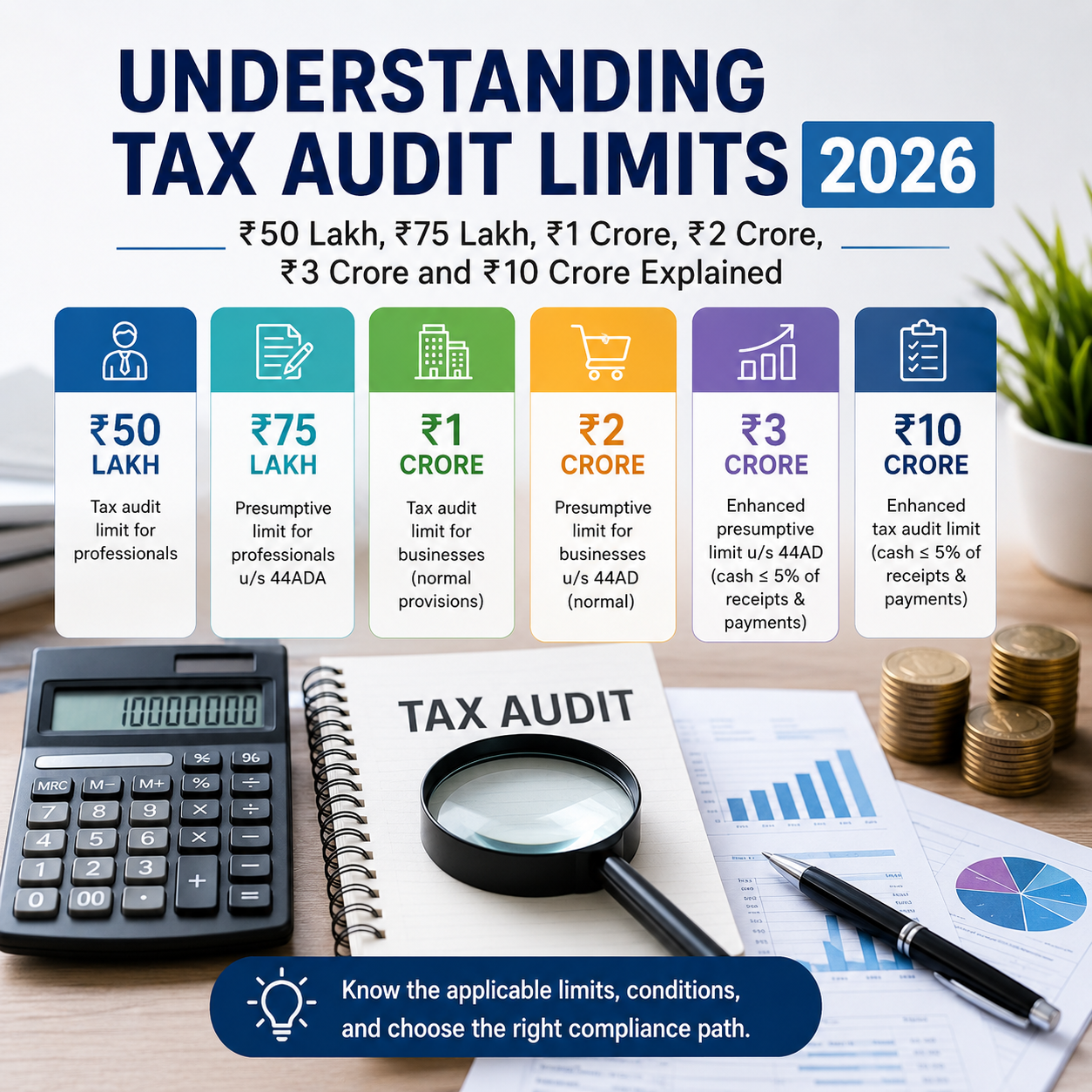
The introduction of the enhanced turnover limit of ₹10 crore for eligible businesses, along with the increased presumptive taxation limits of ₹3 crore under Section 44AD and ₹75 lakh under Section 44ADA, has added to the confusion. Many taxpayers mistakenly treat these limits as interchangeable, even though each provision operates independently and serves a different legislative purpose.
This article provides a practical and detailed explanation of the Tax Audit provisions contained in Section 44AB. It covers the audit requirements for businesses as well as professionals, explains the implications of presumptive taxation schemes under Sections 44AD, 44ADA and 44AE, discusses the benefit of higher turnover limits for businesses with predominantly digital transactions and illustrates the provisions through practical examples to help determine when a Tax Audit is compulsory.
After reading this article, you should be able to assess the applicability of Tax Audit across most real-life scenarios with confidence.
Purpose of Tax Audit
Tax Audit under Section 44AB is much more than a statutory compliance formality. Its primary objective is to ensure that taxpayers maintain proper books of account, compute taxable income accurately and comply with the provisions of the Income-tax Act.
As part of the audit, a Chartered Accountant verifies the books of account and furnishes the prescribed audit report containing the required particulars to the Income Tax Department.
This process promotes transparency in financial reporting, enhances tax compliance and minimizes errors in the reporting of taxable income.
It is important to note, however, that Tax Audit is not compulsory for every taxpayer. The Income-tax Act prescribes specific turnover limits and qualifying conditions that determine whether an audit is required.
Therefore, before considering the applicable turnover threshold, the first step is to identify the category into which the taxpayer falls.
Categories of Tax Audit Cases
For ease of understanding, Tax Audit cases can broadly be classified into the following categories:
| Category |
Relevant Provision |
| Business under Normal Provisions |
Section 44AB |
| Profession under Normal Provisions |
Section 44AB |
| Presumptive Business |
Section 44AD |
| Presumptive Profession |
Section 44ADA |
| Business of Goods Carriages |
Section 44AE |
Correctly identifying the applicable category is the foundation for determining whether Tax Audit is required. Once the relevant category is identified, the corresponding turnover limits and statutory conditions can be applied.
Tax Audit for Businesses
For taxpayers engaged in business, Section 44AB mandates a Tax Audit when the total sales, turnover or gross receipts exceed the prescribed limit during the relevant previous year.
Historically, the threshold for mandatory Tax Audit in the case of businesses has been ₹1 crore.
Accordingly, businesses whose turnover exceeds ₹1 crore are generally required to undergo a Tax Audit.
To encourage digital transactions and discourage cash-based dealings, the Government subsequently introduced a significant relaxation by increasing this threshold from ₹1 crore to ₹10 crore for eligible businesses.
However, this enhanced limit is available only when the prescribed conditions are satisfied:
Conditions for Availing the ₹10 Crore Tax Audit Threshold
The enhanced Tax Audit limit of ₹10 crore is available only when both of the following conditions are fulfilled:
- Total cash receipts during the year do not exceed 5% of the aggregate receipts; and
- Total cash payments during the year do not exceed 5% of the aggregate payments.
These requirements operate cumulatively. In other words, both conditions must be satisfied together.
If even one of these conditions is not met, the benefit of the enhanced limit cannot be claimed. In such a case, the normal Tax Audit threshold of ₹1 crore will apply.
Illustration
Assume a trader records a turnover of ₹6 crore during FY 2025-26.
If cash receipts account for 2% of total receipts and cash payments represent 3% of total payments, both percentages remain within the prescribed 5% limit. Accordingly, the trader qualifies for the enhanced Tax Audit threshold of ₹10 crore.
Since the turnover of ₹6 crore is below ₹10 crore, Tax Audit will not be required.
Now consider another scenario where cash payments increase to 8% of the total payments. As one of the prescribed conditions is breached, the enhanced threshold becomes inapplicable.
The taxpayer must then apply the regular threshold of ₹1 crore. Since the turnover exceeds ₹1 crore, a Tax Audit becomes compulsory.
Presumptive Taxation for Businesses – Section 44AD
Section 44AD offers a simplified taxation scheme for eligible small businesses with the objective of reducing their compliance burden. Taxpayers opting for this scheme are generally relieved from maintaining detailed books of account and undergoing Tax Audit, subject to the prescribed conditions.
A common misconception is that choosing Section 44AD permanently exempts a taxpayer from Tax Audit. In reality, the applicability of Tax Audit depends upon various statutory conditions, making a careful examination necessary in every case.
The scheme is available only to Resident Individuals, Resident Hindu Undivided Families (HUFs) and Resident Partnership Firms. Limited Liability Partnerships (LLPs) are specifically excluded. Likewise, businesses engaged in commission, brokerage, agency activities or certain notified businesses cannot opt for this scheme.
Before examining the Tax Audit implications, it is important to understand the turnover limits prescribed under Section 44AD.
Ordinarily, the scheme can be adopted where business turnover or gross receipts do not exceed ₹2 crore during the financial year. However, to promote digital transactions, the Government has increased this limit to ₹3 crore for eligible businesses.
The enhanced threshold of ₹3 crore is available only if cash receipts during the year do not exceed 5% of the total turnover or gross receipts.
It is essential to distinguish between the ₹3 crore limit under Section 44AD and the ₹10 crore limit under Section 44AB. The former determines whether a taxpayer can opt for presumptive taxation, whereas the latter determines the applicability of Tax Audit for businesses. Since both limits serve different legal purposes, they should not be confused.
Illustration
Suppose Mr. Aman operates a trading business and records turnover of ₹2.75 crore during FY 2025-26.
If only 2% of his turnover is received in cash, he qualifies for the enhanced ₹3 crore threshold and may opt for Section 44AD.
However, if cash receipts constitute 12% of the turnover, the enhanced limit becomes unavailable. Consequently, the standard threshold of ₹2 crore will apply, making him ineligible to opt for Section 44AD.
Presumptive Income under Section 44AD
Where a taxpayer adopts Section 44AD, income is deemed to be:
| Nature of Receipts |
Presumptive Income |
| Receipts through digital modes |
6% of turnover |
| Cash receipts |
8% of turnover |
Taxpayers may voluntarily declare income higher than these prescribed percentages if their actual profits are greater.
The real issue arises when a taxpayer intends to declare profits below the presumptive rates.
Sections 44AD(4) and 44AD(5) provide that where the prescribed conditions are not fulfilled and income lower than the presumptive rate is declared, the taxpayer may become liable to maintain books of account and undergo Tax Audit, particularly if the total income exceeds the basic exemption limit.
Therefore, taxpayers should not assume that opting for Section 44AD automatically and permanently eliminates the requirement of Tax Audit. The provisions relating to lower income declaration and the lock-in conditions must always be carefully considered.
Presumptive Taxation for Professionals – Section 44ADA
Recognising the compliance challenges faced by professionals, the Income-tax Act provides a separate presumptive taxation scheme through Section 44ADA.
This scheme is available only to Resident Individuals and Resident Partnership Firms engaged in specified professions. LLPs are specifically excluded.
Eligible professions generally include legal practice, medicine, engineering, architecture, accountancy, technical consultancy and other notified professions.
Under the regular provisions, professionals are required to undergo a Tax Audit when their gross receipts exceed ₹50 lakh. Section 44ADA, however, provides a simplified alternative for eligible professionals.
Normally, the scheme can be opted for where gross professional receipts do not exceed ₹50 lakh. To encourage digital payments, this threshold has been increased to ₹75 lakh where cash receipts during the year do not exceed 5% of total receipts.
This enhancement has widened the scope of presumptive taxation for professionals.
Illustration
Consider a Chartered Accountant whose gross professional receipts amount to ₹70 lakh during FY 2025-26.
If only 3% of the receipts are received in cash, the enhanced threshold of ₹75 lakh becomes applicable, enabling the professional to opt for Section 44ADA.
However, where cash receipts exceed 5%, the benefit of the enhanced limit is lost and eligibility must be determined based on the normal threshold of ₹50 lakh.
Presumptive Income under Section 44ADA
Under Section 44ADA, 50% of the gross professional receipts are deemed to be taxable income.
For instance, if a professional earns gross receipts of ₹60 lakh, the presumptive income will ordinarily be ₹30 lakh.
The law presumes that the remaining 50% represents expenses incurred while carrying on the profession.
In some situations, however, a professional may believe that the actual income is lower than the deemed 50%.
Such lower income can certainly be declared. However, if the total income exceeds the basic exemption limit, the taxpayer may be required to maintain books of account and comply with Tax Audit provisions.
Accordingly, professionals proposing to declare income below the presumptive rate should first evaluate the resulting compliance obligations.
Presumptive Taxation for Goods Carriage Operators – Section 44AE
Section 44AE provides a separate presumptive taxation scheme for taxpayers engaged in the business of operating, hiring or leasing goods carriages.
The objective of this provision is to simplify tax compliance for small transport operators by relieving them from maintaining detailed books of account in specified cases.
The scheme is available only where the taxpayer owns not more than ten goods vehicles at any point during the relevant previous year.
Unlike Sections 44AD and 44ADA, where presumptive income is calculated as a percentage of turnover or receipts, Section 44AE prescribes fixed presumptive income based on the type and capacity of the vehicle.
Presumptive Income under Section 44AE
| Type of Goods Vehicle |
Presumptive Income |
| Heavy Goods Vehicle |
₹1,000 per ton of gross vehicle weight or unladen weight for every month or part thereof |
| Other Goods Vehicles |
₹7,500 per vehicle for every month or part thereof
Illustration
Assume a transport operator owns five goods vehicles, all of which are classified as vehicles other than heavy goods vehicles, throughout the financial year.
The presumptive income under Section 44AE will be calculated as follows:
₹7,500 × 5 Vehicles × 12 Months = ₹4,50,000
If the taxpayer accepts this presumptive income, compliance requirements remain comparatively simple, and detailed books of account are generally not required.
However, where the taxpayer wishes to declare income lower than the amount prescribed under Section 44AE, the provisions relating to maintenance of books of account and the applicability of Tax Audit must be examined carefully.
Comparison of Sections 44AB, 44AD, 44ADA and 44AE
The table below highlights the key differences among the principal Tax Audit and presumptive taxation provisions.
| Particulars |
Section 44AB (Business) |
Section 44AD |
Section 44ADA |
Section 44AE |
| Applicable To |
Businesses |
Eligible Small Businesses |
Eligible Professionals |
Goods Carriage Businesses |
| Normal Threshold |
₹1 Crore |
₹2 Crore |
₹50 Lakh |
Turnover not relevant |
| Enhanced Threshold |
₹10 Crore |
₹3 Crore |
₹75 Lakh |
Not Applicable |
| 5% Digital Transaction Condition |
Applicable |
Applicable |
Applicable |
Not Applicable |
| Basis of Presumptive Income |
Not Applicable |
6% / 8% of Turnover |
50% of Gross Receipts |
Fixed Amount per Vehicle |
| LLP Eligible |
Yes |
No |
No |
Yes |
| When Tax Audit May Apply |
Based on turnover and prescribed conditions |
Where income is declared below the prescribed 6%/8% rate and other conditions are satisfied |
Where income is declared below 50% and statutory conditions are fulfilled |
Where income lower than the prescribed presumptive amount is declared and applicable conditions are met |
Common Errors While Determining Tax Audit Applicability
Taxpayers frequently make mistakes while analysing whether a Tax Audit is required.
One of the most common errors is treating the ₹3 crore limit under Section 44AD as if it were the same as the ₹10 crore Tax Audit threshold under Section 44AB. In reality, both limits apply for different purposes and cannot be used interchangeably.
Another misconception is that professionals can also claim the ₹10 crore threshold. This relaxation is available only to eligible businesses and has no application to professional assessees.
Many taxpayers also believe that once they opt for Section 44AD or Section 44ADA, they will never be required to undergo a Tax Audit. This assumption is incorrect because declaring income below the presumptive rate or failing to satisfy the statutory conditions may still result in audit requirements.
A further mistake is overlooking the importance of the 5% cash receipt and cash payment condition while claiming the benefit of enhanced thresholds.
These misunderstandings can ultimately lead to incorrect compliance and possible penal consequences.
Practical Approach to Determine Tax Audit Applicability
Whenever the applicability of Tax Audit is being examined, the following step-by-step process should be followed:
- Identify whether the taxpayer is carrying on a business or a profession.
- Check whether any presumptive taxation scheme is applicable.
- Determine the total turnover or gross receipts.
- Calculate the percentage of cash receipts and cash payments.
- Verify whether the enhanced threshold is available.
- Examine whether income is being declared below the prescribed presumptive rate.
- Check whether the total income exceeds the applicable basic exemption limit.
- Apply the relevant provisions of Section 44AB and related presumptive taxation provisions.
Following this structured approach enables taxpayers and professionals to determine Tax Audit applicability correctly in almost every practical situation.
Frequently Asked Questions (FAQs)
Is Tax Audit mandatory if business turnover is ₹5 crore?
Not necessarily. If both cash receipts and cash payments do not exceed 5% of the total receipts and payments respectively, the enhanced threshold of ₹10 crore may be available. In such a case, Tax Audit may not be required.
Can professionals claim the ₹10 crore Tax Audit threshold?
No. The enhanced limit of ₹10 crore is available only for eligible business assessees and does not extend to professionals.
What is the turnover limit under Section 44AD?
The standard eligibility limit is ₹2 crore. This can be increased to ₹3 crore where cash receipts during the year do not exceed 5% of the total turnover or gross receipts.
What is the gross receipt limit under Section 44ADA?
Normally, the limit is ₹50 lakh. However, it increases to ₹75 lakh if cash receipts are not more than 5% of the total gross receipts.
Are LLPs eligible to opt for Sections 44AD or 44ADA?
No. Limited Liability Partnerships are specifically excluded from both presumptive taxation schemes.
Does declaring lower income automatically make Tax Audit compulsory?
No. Declaring income below the presumptive rate alone does not automatically trigger Tax Audit. The other statutory conditions prescribed under the Income-tax Act must also be satisfied before an audit becomes mandatory.
Conclusion
The applicability of Tax Audit cannot be decided solely on the basis of turnover or gross receipts. A proper determination requires a detailed examination of the taxpayer’s business or professional activity, eligibility for presumptive taxation, applicable turnover limits, the percentage of cash transactions and the amount of income actually declared.
The enhanced thresholds of ₹10 crore for eligible businesses, ₹3 crore under Section 44AD and ₹75 lakh under Section 44ADA have significantly reduced compliance requirements for many taxpayers. At the same time, these provisions have also created confusion because each threshold serves a distinct legal purpose.
Accordingly, taxpayers and professionals should adopt a systematic approach while evaluating Tax Audit applicability. By first identifying the relevant statutory provision and then applying the prescribed conditions, even complex Tax Audit issues can be analysed accurately and resolved with confidence. |