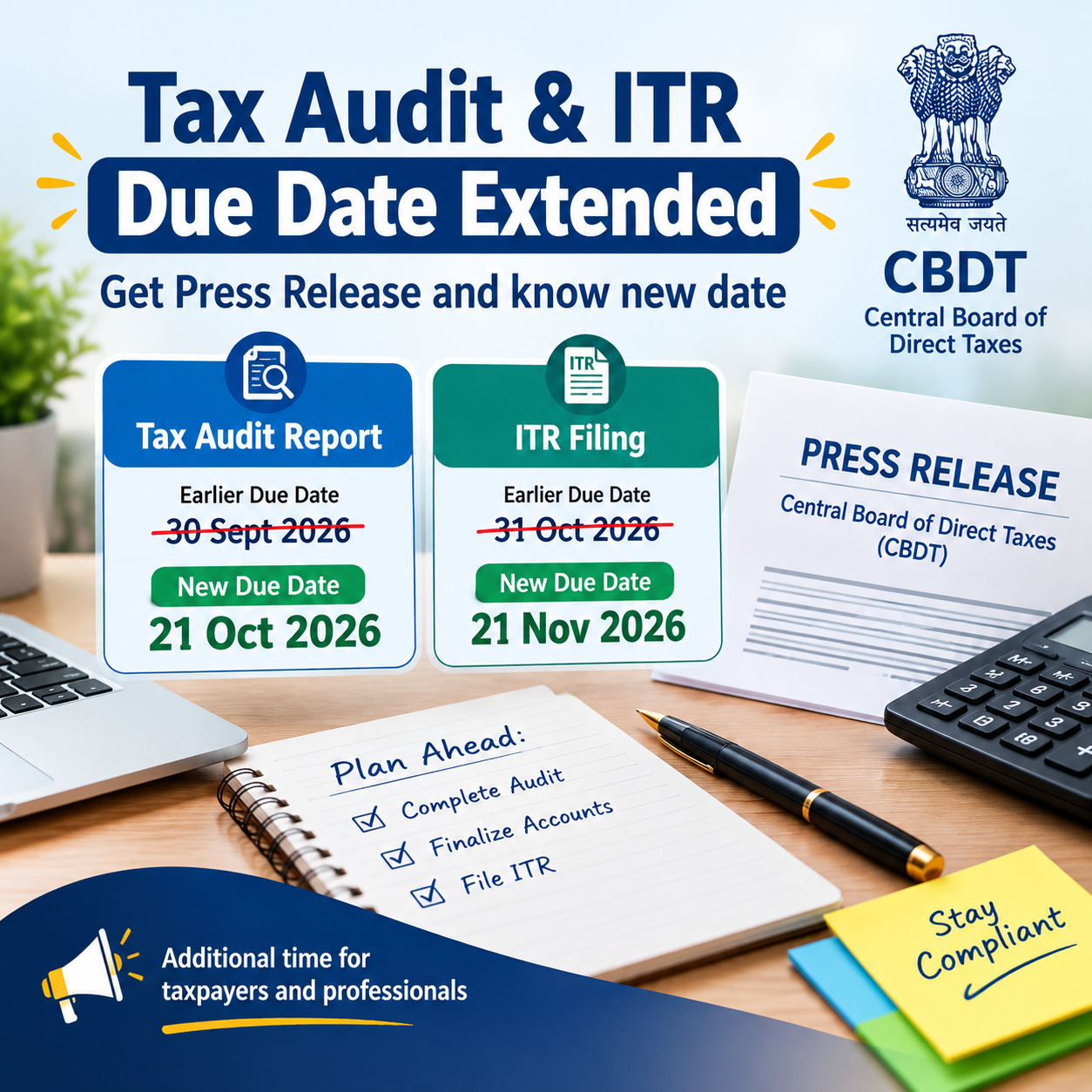
The Central Board of Direct Taxes (CBDT) has announced a significant extension of the due dates for filing the Tax Audit Report and Income Tax Return for Assessment Year 2026-27. The extension applies to taxpayers who fall under the specified audit category covered by Section 139(1) of the Income-tax Act, 1961. The CBDT issued its press release on 28 September 2026, confirming an extension of the applicable deadlines. The revised timelines are intended to give the affected taxpayers and tax professionals additional time to complete the audit formalities and file their income tax returns.
The Central Board of Direct Taxes (CBDT) has announced an extension of the due date for filing the Return of Income for Assessment Year 2026-27 for taxpayers covered under S. No. 2 of the Table below Explanation 2 to Section 139(1) of the Income-tax Act, 1961.
For such taxpayers, the income tax return filing deadline has been extended from 31 October 2026 to 21 November 2026. Consequently, the specified date for furnishing the tax audit report for AY 2026-27 has also been extended from the earlier date to 21 October 2026.
The CBDT has issued a press release confirming these revised deadlines.
Tax Audit Deadline Revised
According to the CBDT press release, the “specified date” for submitting the audit report under the Income-tax Act, 1961 has been extended for the applicable category of taxpayers.
The original deadline was:
30 September 2026
The new deadline announced by CBDT is:
21 October 2026
Accordingly, taxpayers covered under the specified category will have additional time to complete and furnish their tax audit reports.
The change is especially relevant to taxpayers whose accounts are required to undergo tax audit and to Chartered Accountants responsible for preparing, finalising, and uploading the related audit reports.
Income Tax Return Deadline Also Revised
CBDT has simultaneously extended the Income Tax Return filing deadline for AY 2026-27 for taxpayers falling under the specified category.
The previous deadline was:
31 October 2026
The revised deadline is:
21 November 2026
Therefore, the extension provides additional time for both completion of the audit-report requirements and subsequent filing of the income tax return for the taxpayers covered by the announcement.
Extension Applies Only to the Specified Category
Taxpayers should note that the CBDT announcement does not constitute a blanket extension for all taxpayers.
The press release specifically covers persons referred to at Serial No. 2 in the table under Explanation 2 to Section 139(1) of the Income-tax Act, 1961.
Therefore, taxpayers should verify whether their particular case falls within this specified category before relying on the revised deadlines.
Revised Tax Audit Report Date
The CBDT press release clearly provides that the “specified date” for furnishing the audit report has been shifted from 30 September 2026 to 21 October 2026.
In practical terms, the audit-report deadline is extended first, followed by the revised ITR filing deadline applicable to the specified category.
Particulars
Earlier Deadline
Revised Deadline
Tax Audit Report – specified date
30 September 2026
21 October 2026
ITR for AY 2026-27 – specified category
31 October 2026
21 November 2026
What Additional Time Can Be Used For
For taxpayers covered by the CBDT announcement, the extended timeline can help provide additional time to:
Complete the tax audit process
Finalise books and financial records
Complete audit-related disclosures and reporting
Furnish and upload the audit report
Verify tax calculations and liabilities
Prepare and review the Income Tax Return
Reconcile applicable tax-related information before filing the return
At the same time, taxpayers should remember that this extension is not a universal extension applicable to every taxpayer.
Separate Formal Order or Notification
The CBDT press release also indicates that a separate formal order/notification will be issued to give effect to the revised deadlines.
Taxpayers and tax professionals should therefore refer to the formal CBDT order or notification as well for the detailed operative provisions of the extension.
Key Points at a Glance
The key dates announced in the CBDT press release dated 28 September 2026 for the specified audit category for AY 2026-27 are:
Tax Audit Report:
30 September 2026 → 21 October 2026
Income Tax Return:
31 October 2026 → 21 November 2026
The revised dates apply specifically to the persons covered by the category identified in the CBDT announcement. Therefore, taxpayers should first confirm their eligibility for the extension rather than assuming that the revised deadlines apply to all taxpayers.
NRI Property Purchase: TAN Not Required from 1 October 2026 | New TDS Compliance Rules
CBDT has issued Notification No. 121/2026 dated 22 September 2026, introducing significant procedural changes for TDS compliance when an immovable property is purchased from a non-resident. The amendment is especially relevant for resident Individuals and HUFs who purchase property from an NRI.
The Finance Act, 2026 had already provided that, from 1 October 2026, a resident Individual or HUF will not need to obtain a TAN for deducting tax on consideration paid for the transfer of immovable property to a non-resident. The latest CBDT notification now gives effect to the related changes in the Income-tax Rules and introduces a new reporting mechanism through Form No. 141 along with Schedule E.
The notification, known as the Income-tax (Fifth Amendment) Rules, 2026, will apply from 1 October 2026.
What Changes from 1 October 2026?
Consider a situation where a resident Individual purchases a house in India from an NRI.
Under the earlier compliance framework, TDS had to be deducted on payments made to a non-resident. Since the transaction was covered by the provisions applicable to payments to non-residents, the buyer was required to obtain a TAN for TDS compliance.
The Finance Act, 2026 has now provided relief from this additional requirement.
The amendment was introduced because obtaining a TAN for an individual property transaction can create an unnecessary compliance burden, particularly where a resident Individual or HUF makes only a one-time purchase from an NRI.
Accordingly, the relevant provision has been amended to remove the TAN requirement for eligible resident Individuals and HUFs with effect from 1 October 2026.
An Important Clarification
Removal of TAN does not mean removal of TDS.
This distinction is crucial.
From 1 October 2026, an eligible resident Individual or HUF can deduct the applicable TDS without obtaining TAN. However, the underlying TDS obligation on the payment made to the non-resident seller will continue to apply.
Why Has the Government Introduced This Change?
The amendment addresses the difference in compliance requirements between property purchases from resident and non-resident sellers.
When the Property Seller Is a Resident
For specified property transactions involving a resident seller, an Individual or HUF can comply with the applicable TDS provisions without obtaining TAN, subject to the prescribed conditions and procedures.
When the Property Seller Is a Non-Resident
Property transactions involving an NRI seller are subject to the TDS provisions applicable to payments made to non-residents. Under the earlier framework, this could require the resident buyer to obtain a TAN, even when purchasing only one property.
The 2026 amendment seeks to reduce this additional compliance requirement.
The Budget memorandum explained that the change provides a relaxation from the requirement to obtain TAN for a resident Individual or HUF in cases involving the purchase of immovable property from a non-resident.
Which TDS Provision Applies to Property Purchased from an NRI?
The Income-tax Act, 2025 reorganised the TDS provisions into a tabular structure.
For payments made to non-residents, Section 393(2), Table Serial No. 17 covers specified payments, including amounts chargeable to tax that are not taxable under the head “Salaries.”
Therefore, where a resident Individual or HUF purchases immovable property from a non-resident and the payment is subject to TDS, the relevant framework is:
Section 393(2) → Table Serial No. 17
Section 393(2) Applies — Not the Regular Resident-Property TDS Provision
For a property transaction involving a non-resident seller, the applicable provision is Section 393(2), Table Serial No. 17, rather than the ordinary TDS provision applicable to property purchases from a resident under Section 393(1).
What Did CBDT Notify on 22 September 2026?
The CBDT Notification No. 121/2026 dated 22 September 2026 introduces important procedural amendments relating to TDS on purchases of immovable property from non-residents.
The notification makes changes to Rules 215, 218 and 219 and revises Forms 132 and 141. These amendments will take effect from 1 October 2026.
Broadly, the changes can be divided into four key areas:
TAN exemption for eligible Individuals and HUFs
Procedure for depositing TDS
Reporting of TDS through Form 141
Issuance of TDS certificate through Form 132
Let us look at each change in detail.
1. TAN Will Not Be Required from 1 October 2026
The most significant relief comes from the amendment to Section 397.
A resident Individual or HUF who is required to deduct TDS on consideration paid for the transfer of immovable property to a non-resident will no longer need to obtain a TAN, subject to the conditions prescribed under the law.
The Finance Act, 2026 specifically brought this category within the exemption provided under Section 397(1)(c).
TDS Position Before and After 1 October 2026
Particular
Up to 30 September 2026
From 1 October 2026
Buyer
Resident Individual/HUF
Resident Individual/HUF
Seller
Non-resident
Non-resident
TDS
Applicable
Applicable
Relevant provision
Section 393(2), Table 17
Section 393(2), Table 17
TAN
Required
Not required
Reporting
Existing non-resident TDS procedure
Form 141 – Schedule E
TDS Certificate
Existing procedure
Form 132
Therefore, the amendment should not be interpreted as an exemption from TDS.
The correct takeaway is:
From 1 October 2026, a resident Individual or HUF purchasing immovable property from a non-resident can deduct the applicable TDS without obtaining TAN.
2. Form 141 Gets a New Reporting Framework
Another significant change introduced through the 22 September 2026 notification relates to Form No. 141.
The existing form has been modified so that it now also covers transactions falling under Section 393(2), Table Serial No. 17.
The notification has specifically added this provision to the heading of Form 141.
More importantly, a new section titled:
Schedule E — TDS on Consideration for Transfer of Immovable Property under Section 393(2), Table Serial No. 17
has been incorporated into Form 141.
This new schedule provides the reporting framework for these transactions after the TAN requirement has been removed.
What Details Must Be Reported in Schedule E?
The newly introduced Schedule E requires detailed information concerning the property, buyers, non-resident sellers and the corresponding TDS transaction.
1. Information About the Property
The buyer will have to provide details such as:
Complete address of the immovable property
Nature/type of property
The available property categories include:
Land other than agricultural land
Building or a part of a building
Both land and building
These details form part of the newly prescribed Schedule E.
2. Information of All Buyers
Schedule E also requires details of every buyer involved in the transaction.
The information includes:
Serial number
Buyer’s PAN
Buyer’s name
Percentage/proportion of the total consideration payable or credited by each buyer
The total proportion reported for all buyers should add up to 100%.
Example of a Joint Property Purchase
Suppose a husband and wife jointly purchase a property.
The reporting could reflect:
Husband — 50%
Wife — 50%
The form therefore captures the PAN and respective share of consideration for each buyer.
3. Detailed Information About Non-Resident Sellers
Since the transaction involves a non-resident seller, Schedule E requires additional information about each seller/deductee.
The prescribed details include:
PAN, where available
Name of the seller
Status
Contact number
Email address
Foreign residential address
Tax Residency Certificate number
Tax Identification Number
Proportion of the total sale consideration received or debited to each seller
This makes the reporting requirements more detailed than those generally applicable to a standard resident-property TDS transaction.
PAN Alone Is Not Sufficient for an NRI Seller
One of the important points in the amended Form is contained in Note 6.
The prescribed note clarifies that the contact number, email address and foreign address of the non-resident deductee are mandatory, regardless of whether the non-resident has a PAN.
In cases where the non-resident seller does not have a PAN, the specified details relating to the seller’s Tax Residency Certificate (TRC) and Tax Identification Number (TIN) may also be required in accordance with Rule 217 to determine the applicable rate and avoid higher-rate deduction where the prescribed conditions are satisfied.
Therefore, buyers should not assume that the absence of the seller’s PAN automatically means that TDS can simply be deducted at a higher rate.
The new Schedule E has been specifically structured to collect comprehensive information about the non-resident seller and the applicable tax details.
4. Agreement Date and Registration Date
The newly introduced Schedule E also captures important dates related to the property transaction.
The buyer is required to provide:
Date of agreement
Date of registration, wherever applicable or available
These details help establish the sequence and timing of the property transaction for reporting and TDS purposes.
5. Sale Consideration and Stamp Duty Value
Schedule E specifically requires reporting of two important amounts:
Total Stamp Duty Value of the property
Total Sale Consideration relating to the property
These figures are relevant for determining the appropriate tax treatment and TDS liability in transactions involving a non-resident seller.
The transaction cannot simply be treated in the same manner as the standard 1% TDS mechanism applicable to purchases from resident sellers. The applicable provisions for payments to a non-resident have to be examined separately.
6. Instalment-Based Property Payments Are Also Included
The new Schedule E recognises that the purchase consideration may be paid in multiple instalments rather than in a single payment.
The buyer must specify whether the consideration is being paid:
In a lump sum, or
Through instalments
Where payment is made in instalments, the form further requires the buyer to identify whether the payment represents:
First instalment
Subsequent instalment
Final instalment
For a subsequent or final instalment, the acknowledgement number of the earlier filing is also required.
In the case of the final instalment, the form additionally requires the total consideration paid or credited, including the current instalment.
This provision is particularly relevant for NRI property transactions, where the sale consideration may commonly be settled through several payments.
7. Information Relating to the NRI Seller’s Capital Gains
Schedule E does not merely capture payment-related information. It also seeks specific details concerning the tax treatment of the non-resident seller.
The form requires information such as:
PAN of the deductee/seller
Name of the seller
Whether the seller has opted out of the applicable tax regime under Section 202(1), wherever relevant
Nature of capital gains arising to the seller
The capital-gain category includes options such as:
Long-term capital gains
Short-term capital gains, excluding specified gains
This is important because TDS in a transaction involving an NRI is determined with reference to the amount chargeable to tax and the applicable provisions/rate. It is therefore different from simply applying the standard 1% TDS rule used for specified property purchases from resident sellers.
8. Detailed TDS Calculation Information
The new Schedule E also provides for reporting of the actual TDS computation.
The relevant fields include:
Proportionate stamp duty value
Amount paid or credited through earlier instalments
Amount paid or credited in the current transaction
Date of payment or credit
Amount on which TDS is applicable
Applicable TDS rate
Certificate number under Section 395(1), where obtained by the deductee
Certificate number under Section 395(2), where obtained by the deductor
TDS amount deducted
Date of TDS deduction
These requirements indicate that Form 141 is designed as a detailed transaction-level reporting statement, rather than being merely a replacement form after the removal of the TAN requirement.
What Happens If the NRI Has a Lower or Nil TDS Certificate?
The new reporting framework also takes into account situations where the non-resident seller has obtained a lower or nil deduction certificate.
Schedule E provides a specific field for the certificate number issued under Section 395(1) when the deductee has obtained such a certificate.
It also provides a separate field for the certificate issued under Section 395(2) where the certificate has been obtained by the deductor.
Therefore, the removal of the TAN requirement does not mean that the lower or nil deduction certificate provisions have been discontinued.
The buyer must still determine the applicable TDS after considering the provisions relevant to the non-resident seller and the amount chargeable to tax.
Payment and Form 141 Compliance Under the Amended Rules
The CBDT notification has also made corresponding amendments to the procedural rules.
Rule 218(3) has been modified to specifically include consideration for the transfer of immovable property covered under Section 393(2), Table Serial No. 17, where the payment or credit is made by a resident Individual or HUF.
A corresponding amendment has also been made to Rule 219(5), which now specifically refers to the same category of transactions.
Therefore, the notification goes beyond simply changing the format of a form. The relevant Rules have also been updated to establish the payment and reporting procedure for these transactions.
Form 132 Also Covers NRI Property Transactions
CBDT has additionally amended Rule 215(1).
The revised provision now covers TDS deducted under:
Section 393(2), Table Serial No. 17
where a resident Individual or HUF deducts tax from consideration payable for the transfer of immovable property.
As a result, Form No. 132 has also been revised.
The amended form specifically covers transactions involving:
Transfer of immovable property by a non-resident to a resident Individual or Hindu Undivided Family.
Thus, from 1 October 2026, the overall compliance process can be understood as:
TDS deduction → Payment and reporting through Form 141 → TDS certificate through Form 132
The key benefit is that an eligible resident Individual or HUF does not need to obtain TAN merely for carrying out this TDS compliance on the purchase of immovable property from a non-resident.
What TDS Rate Applies to Property Purchased from an NRI?
Buyers need to be especially cautious about the TDS rate in these transactions.
A purchase of property from a non-resident seller should not be treated in the same way as the standard property transaction involving a resident seller under Section 393(1), Table Serial No. 3(i), where the specified 1% TDS mechanism applies subject to the prescribed conditions.
For a transaction involving an NRI seller, the relevant provision is:
Section 393(2) — Table Serial No. 17
This provision deals with specified sums chargeable to tax that are paid to a non-resident.
Therefore, it would be incorrect to apply the general statement:
“Property purchase means 1% TDS.”
The 1% mechanism relates to the specified resident-seller property transaction. In an NRI property purchase, the buyer must determine TDS by considering the amount chargeable to tax, applicable tax rates, relevant treaty provisions where applicable, and any valid lower or nil deduction certificate.
How Is TDS Handled in a Joint Property Purchase?
The new Schedule E of Form 141 becomes particularly important where more than one person purchases the property.
For example:
Mr. A — Resident Individual — 50% share
Mrs. A — Resident Individual — 50% share
If they jointly purchase property from an NRI, Schedule E requires details of each buyer, including:
PAN
Name
Proportion of the total consideration
The same principle applies when there are multiple non-resident sellers. The form requires information relating to each seller/deductee and their respective share of the consideration.
Another important procedural point is that where there is more than one deductor, each deductor is required to furnish a separate form.
This makes buyer-wise reporting particularly important in joint property transactions.
What If the NRI Seller Does Not Have a PAN?
The amended reporting framework also deals with cases where the non-resident seller does not have a PAN.
The following details must be provided:
Contact number
Email address
Address outside India
These details are required irrespective of whether the seller has a PAN.
Where PAN is not available, the prescribed information relating to the seller’s tax residency and identification in the country of residence must also be furnished, wherever applicable, so that the relevant TDS-rate provisions can be properly considered.
Practical Tip for Buyers
A buyer should collect the NRI seller’s required overseas tax information before the transaction is completed.
Waiting until the TDS filing stage may create avoidable compliance issues, particularly where the seller’s PAN, Tax Residency Certificate or Tax Identification Number is required.
Old TDS Framework vs New Framework
Property Purchased by a Resident Individual/HUF from an NRI
Particular
Up to 30 September 2026
From 1 October 2026
Buyer
Resident Individual/HUF
Resident Individual/HUF
Seller
Non-resident
Non-resident
Applicable provision
Section 393(2), Table 17
Section 393(2), Table 17
TDS
Applicable, subject to chargeability
Applicable, subject to chargeability
TAN
Required
Not required
Reporting
Existing non-resident TDS procedure
Form 141 – Schedule E
TDS Certificate
Applicable
Form 132
Seller information
Required
More detailed prescribed reporting
Joint purchasers
Applicable
Buyer-wise details required
Instalment payments
Applicable
Specifically reported in Schedule E
Lower/Nil deduction certificate
Available subject to conditions
Available subject to conditions
Why Is CBDT Notification No. 121/2026 Significant?
The change announced in Budget 2026 was the starting point for removing the TAN requirement.
The Finance Act, 2026 amended the relevant provision so that, from 1 October 2026, a resident Individual or HUF purchasing immovable property from a non-resident would no longer need to obtain TAN solely for this TDS obligation.
However, removing TAN also required the government to establish an alternative compliance mechanism.
The transaction still needs to be properly:
Reported
Linked with the buyer and seller
Matched with the property details
Accompanied by the applicable TDS payment
Reflected in the TDS certificate
The CBDT Notification No. 121/2026 dated 22 September 2026 addresses these procedural requirements by making amendments to the relevant Income-tax Rules and modifying Forms 132 and 141.
The introduction of Schedule E in Form 141 is particularly important because it provides a dedicated reporting structure for transactions covered by Section 393(2), Table Serial No. 17.
Effective From 1 October 2026
The Income-tax (Fifth Amendment) Rules, 2026 come into force from 1 October 2026.
Therefore, the relevant date of the transaction/payment becomes important.
Transactions falling before 1 October 2026
The existing compliance framework, including the applicable TAN requirement, continues to apply.
Transactions falling on or after 1 October 2026
Where a resident Individual or HUF purchases immovable property from a non-resident, TAN will no longer be required under the amended provisions. However, the applicable TDS, payment and reporting requirements will continue.
Practical Checklist for Buying Property from an NRI
Before proceeding with the transaction, a resident Individual or HUF should keep the following information ready.
Buyer Details
PAN
Name
Residential status
Share in the property/consideration
NRI Seller Details
PAN, if available
Name
Overseas address
Contact number
Email address
Tax Residency Certificate details
Tax Identification Number
Share of sale consideration
Property Information
Property address
Type/nature of property
Agreement date
Registration date, where available
Stamp Duty Value
Total sale consideration
TDS Information
Previous instalment payments
Current payment
Date of payment/credit
Amount subject to TDS
Applicable TDS rate
TDS amount
Lower/Nil deduction certificate details, where applicable
The new Schedule E provides for reporting of these categories of information.
Key Takeaway
The amendment effective from 1 October 2026 provides procedural relief to resident Individuals and HUFs purchasing immovable property from non-resident sellers.
However, the most important distinction is:
TAN has been removed — TDS has not been removed.
From 1 October 2026, an eligible resident Individual or HUF will not need to obtain TAN merely because TDS is required on the purchase of immovable property from a non-resident under Section 393(2), Table Serial No. 17.
At the same time, the buyer must continue to comply with the applicable TDS provisions and the newly prescribed reporting mechanism through Form 141 with Schedule E, along with the TDS certificate requirements under Form 132.
In Simple Terms
Property purchased from a Resident → Section 393(1), Table Serial No. 3(i)
Property purchased from a Non-Resident → Section 393(2), Table Serial No. 17
From 1 October 2026 → Resident Individual/HUF buying from NRI → No TAN requirement → TDS obligation continues → Form 141 + Schedule E reporting → Form 132 TDS certificate
Several new rules are scheduled to take effect, important compliance deadlines will fall during the month, and some major policy developments may also emerge.
In particular, people should keep an eye on important updates related to Income Tax, GST, UPI, PF, TDS, Aadhaar, and LPG.
It is important to note that not all of these changes will come into effect on 1 October itself. Some rules will become effective from 1 October, some are important developments taking place during October, while others were introduced in September but may have a more visible practical impact from October onwards.
Let us understand these updates one by one.
1. UPI MDR to Apply from 15 October 2026 — What You Need to Know
One of the major UPI-related developments in October concerns the introduction of a Merchant Discount Rate (MDR) framework.
From 15 October 2026, a new MDR framework will apply to specified Person-to-Merchant (P2M) UPI transactions. For eligible merchant transactions above ₹2,000, the standard MDR will be 0.4%. For transactions of ₹75,000 or more, the maximum MDR will be capped at ₹300 per transaction.
However, this does not mean that customers will have to pay a 0.4% charge on every UPI payment.
Person-to-Person (P2P) UPI transactions will continue to remain free. MDR will also not apply to merchant payments up to ₹2,000 and eligible transactions involving small merchants covered under the zero-MDR framework.
Another important point is that MDR is not a Government tax. It is a merchant-side charge distributed among participants in the payment ecosystem. Banks have also been advised to ensure that merchants do not pass this cost on to customers.
Therefore, if you make a UPI payment of ₹5,000 or ₹10,000, it should not automatically be interpreted as a “0.4% UPI tax” on the customer.
2. Tax Audit: Penalty Risk After 30 September 2026
For businesses and professionals, 30 September 2026 is an important compliance deadline.
For tax audit cases relating to FY 2025-26 (AY 2026-27), the due date for furnishing the tax audit report is 30 September 2026. The Income Tax Department has clarified that tax audits for FY 2025-26 will continue to be governed by the Income-tax Act, 1961, even if the audit report is filed after 1 April 2026.
If the tax audit report is not furnished by 30 September and the Government does not grant any extension, there may be an exposure to penalty under Section 271B.
The penalty is generally:
0.5% of turnover or gross receipts
or
₹1,50,000
whichever is lower.
ITR Due Date for Tax Audit Cases
For regular tax audit cases, the due date for filing the Income Tax Return (ITR) is 31 October 2026. Different deadlines may apply to taxpayers covered by transfer-pricing provisions.
According to the Income Tax Department’s FAQ, for FY 2025-26, the tax audit report is due by 30 September 2026, while the applicable ITR for audit cases is generally due by 31 October 2026.
3. Important GST Council Meeting Scheduled for 7 October 2026
Another major event for GST taxpayers in October is the upcoming 57th GST Council Meeting.
The 57th GST Council Meeting is now scheduled to be held on 7 October 2026 in New Delhi. The meeting was originally planned for 12 September but was later rescheduled. The meeting of GST officials is expected to take place on 5–6 October.
The meeting may discuss several GST process and compliance reforms, including matters relating to ITC rules, GST registration, e-invoicing, refunds, and GST-related litigation.
However, taxpayers should keep one important point in mind:
A discussion or recommendation by the GST Council does not automatically mean that a new GST rule will become effective on the same day.
Where required, any proposed change may need a formal notification, amendment to the rules, or a legislative amendment before it becomes applicable.
Therefore, taxpayers with an existing GST demand, ITC dispute, or statutory compliance deadline should not postpone their existing compliance obligations simply because they are waiting for the 7 October meeting.
4. No TAN Requirement for Property Purchase from an NRI
From 1 October 2026, the TAN requirement for a resident Individual or HUF purchasing immovable property from an NRI for TDS purposes is being removed.
As per Budget 2026, in such transactions the buyer will be able to deduct and report TDS using their PAN. The seller’s PAN will also need to be quoted in the relevant challan-cum-statement.
In simple terms, the earlier mechanism was:
Resident Individual/HUF + NRI Seller → TAN required
It is important to understand that removal of the TAN requirement does not mean that the TDS obligation itself has been abolished. Applicable TDS provisions will continue to apply, and the buyer must comply with the relevant requirements.
This change is particularly relevant for individuals and HUFs purchasing immovable property from NRI sellers.
5. EPF Wage Ceiling Increased from ₹15,000 to ₹25,000
A significant employee-related development concerns EPFO coverage.
The Government has increased the wage ceiling for mandatory EPFO coverage from:
₹15,000 → ₹25,000 per month
The change is effective from 17 September 2026, meaning its practical implications may start appearing in October payroll and subsequent payroll processing. According to the Government, around 51 lakh additional employees could potentially come under EPFO coverage.
This means that a substantial number of eligible employees earning wages between ₹15,000 and ₹25,000 per month may now come within the statutory EPF framework, subject to the applicable scheme provisions.
For example, if the contribution is calculated at 12% on the revised ceiling of ₹25,000:
₹25,000 × 12% = ₹3,000
Under the earlier ₹15,000 ceiling:
₹15,000 × 12% = ₹1,800
This results in a potential difference of:
₹3,000 − ₹1,800 = ₹1,200
However, the actual EPF contribution for an individual employee will depend on the person’s applicable EPF membership status and the relevant provisions of the scheme.
6. Children’s Aadhaar Mandatory Biometric Update — Free Facility Available Until 30 September
Parents should also take note of an important deadline at the end of September.
According to UIDAI, the Mandatory Biometric Update (MBU) for children aged 5 to 17 years is available free of charge until 30 September 2026.
Therefore, if your child’s mandatory biometric update is still pending, it would be advisable to complete it before 30 September, as the special free-of-cost facility is available only until this date.
One important clarification is that this is not the regular Aadhaar authentication process. It refers specifically to the Mandatory Biometric Update, under which biometric details such as the child’s fingerprints, iris scans, and photograph are updated.
7. Aadhaar Biometric Authentication Required for Subsidised LPG
Another important consumer-related development takes effect from October.
From 1 October 2026, domestic LPG consumers will need to complete Biometric Aadhaar Authentication (BAA) to book refills at the regulated retail selling price along with the applicable subsidy.
Consumers who have not yet completed the authentication can reportedly do so through any of the following options:
At the time of LPG delivery
At the LPG distributor’s showroom
Through the relevant Oil Marketing Company’s mobile application
According to the Government, 27.43 crore consumers, or approximately 89.9%, had already completed the authentication. Those consumers do not need to take any further action.
LPG consumers should therefore check whether their Aadhaar biometric authentication has already been completed.
8. TDS and TCS: Key Points to Keep in Mind During October
TDS and TCS compliance will also remain important for businesses during October. With the transition to the new Income-tax Act, taxpayers must be particularly careful not to confuse FY 2025-26 / AY 2026-27 with FY 2026-27 / Tax Year 2026-27.
Compliance relating to income earned during FY 2025-26 (AY 2026-27) will continue to be governed by the Income-tax Act, 1961.
On the other hand, income relating to FY 2026-27 (Tax Year 2026-27) will fall under the framework of the new Income-tax Act, 2025.
The Income Tax Department has provided clarification regarding this transition.
Therefore, while filing TDS/TCS returns, making challan payments, issuing certificates, or completing other related compliances during October, taxpayers should ensure that they select the correct financial year, tax year, applicable Act, and relevant form.
9. Companies Should Also Review Their MCA/ROC Compliance
For companies, October is not limited to tax-related compliance. Depending on the company’s AGM date and applicable provisions, several MCA/ROC filings may also become due during October.
These may include, where applicable:
AOC-4 / AOC-4 XBRL
ADT-1
MSME-related reporting
Other event-based ROC filings
The exact due date is not the same for every company. Certain filings depend on factors such as the actual AGM date and the company’s category.
Companies should therefore review their MCA compliance calendar before the beginning of October and identify all applicable filing deadlines.
10. Do Not Miss Regular GST and Other October Compliance Deadlines
The GST Council meeting is not the only GST-related development to watch in October. Regular GST return filing and tax payment obligations will continue to apply according to their respective due dates.
Taxpayers should not assume that the 7 October GST Council meeting will automatically postpone existing GST return or tax payment deadlines.
Accordingly, GSTR-1, GSTR-3B, CMP-08, and other applicable GST compliances should continue to be completed within their respective due dates, unless the Government officially announces a specific extension.
October 2026: Major Updates at a Glance
Update
Important Date
Who Is Affected?
TAN requirement removed for resident Individual/HUF purchasing property from an NRI
1 October 2026
NRI property buyers
Aadhaar Biometric Authentication for LPG
1 October 2026
Eligible subsidised LPG consumers
57th GST Council Meeting
7 October 2026
GST taxpayers and businesses
UPI MDR framework
15 October 2026
Specified merchant transactions
PF wage ceiling increased from ₹15,000 to ₹25,000
17 September 2026; impact on October payroll
Eligible employees and employers
Free Aadhaar MBU facility for children ends
30 September 2026
Children aged 5–17
Tax Audit Report due date
30 September 2026
Tax audit cases
ITR due date for audit cases
31 October 2026
Tax audit cases
Conclusion
October 2026 is more than just the beginning of a new month. It brings several important compliance requirements, regulatory developments, and financial updates that may affect taxpayers, businesses, employees, and consumers.
Before October begins, it is therefore important to prepare a checklist covering GST returns, tax audit, ITR filing, TDS/TCS, PF, Aadhaar, LPG requirements, MCA/ROC filings, and other applicable compliances.
Keeping track of the relevant dates and completing the required actions on time can help taxpayers and businesses stay up to date with the applicable rules.
Tax Audit Deadline 30 September 2026: No Extension Yet — What CAs Should Do Now
With the 30 September 2026 tax audit deadline approaching, Chartered Accountants across India are closely watching for one key development: will the government extend the deadline or will 30 September remain the final date?
As of 21 September 2026, there has been no official CBDT notification announcing an extension.
Current Tax Audit Due Date — No Extension Announced
For FY 2025-26 / AY 2026-27, the current compliance position is:
Compliance
Due Date
Tax Audit Report — Form 3CA/3CB-3CD under Section 44AB
30 September 2026
ITR filing for taxpayers subject to audit
31 October 2026
Transfer Pricing cases — Form 3CEB under Section 92E
Audit: 31 October 2026 / ITR: 30 November 2026
At present, no notification has been issued changing these dates.
For AY 2026-27, the Income-tax Act, 1961 continues to apply. The new Income-tax Act, 2025 applies prospectively from FY 2026-27. Therefore, the applicable tax-audit provisions, including Section 44AB and the existing Section 271B penalty framework, continue to be relevant for FY 2025-26.
Who Is Required to Get a Tax Audit?
The major tax-audit thresholds can be summarized as follows:
Category
Basic Limit
Enhanced Limit*
Business under Section 44AB
₹1 crore
₹10 crore
Profession under Section 44AB
₹50 lakh
—
Business under Section 44AD where presumptive provisions are not followed
₹2 crore
₹3 crore
Profession under Section 44ADA where presumptive provisions are not followed
₹50 lakh
₹75 lakh
*Enhanced limits are subject to the prescribed conditions relating to cash receipts and payments, including the 5% threshold.
These limits should always be checked against the specific facts and applicable provisions.
Why Is There a Demand for More Time?
Several practical difficulties have contributed to requests from professional bodies for an extension.
1. A Tight Compliance Calendar
For taxpayers who are not covered by tax audit, the ITR deadline was 31 August 2026. The tax-audit report deadline follows on 30 September, while ITR filing for audit cases is generally due on 31 October.
This creates a particularly busy period for tax professionals during August, September and October.
2. Transition to the New Income-Tax Law
FY 2025-26 / AY 2026-27 is an important transition period.
Although the new Income-tax Act, 2025 comes into operation from FY 2026-27, AY 2026-27 remains governed by the Income-tax Act, 1961.
Accordingly, tax audits for FY 2025-26 continue to involve the existing framework, including Forms 3CA/3CB and Form 3CD.
This makes it important for professionals to ensure that the correct provisions and forms are being applied to the correct assessment year.
3. Availability of Forms and Utilities
Professional associations have also highlighted delays concerning the availability of certain return forms and utilities.
Tax audit work involves more than reviewing accounting records. Information reported during the audit often needs to be reconciled with the taxpayer’s return and related schedules.
4. Extensive Reconciliation and Reporting
Tax auditors need sufficient time for activities such as:
Reviewing financial information
Reconciling accounting and tax records
Verifying supporting documents
Preparing and reviewing Form 3CD
Checking applicable tax positions
Collecting confirmations and other evidence
Completing professional review and authentication
The Chartered Accountants Association, Jalandhar, has referred to these additional requirements while seeking an extension of the deadline to 31 October 2026.
5. Client Information May Arrive Late
Another practical challenge is the timely receipt of complete information from clients.
Depending on the nature of the business, auditors may need:
Final books of accounts
Bank statements
GST records
TDS/TCS information
Fixed-asset schedules
Loan and interest details
Related-party information
Stock and inventory records
Expense ledgers
Confirmations and other audit evidence
Consequently, although the statutory deadline is 30 September 2026, the actual time available to complete an audit may be considerably shorter.
6. Filing the Audit Report Is Not the Final Step
Another important point is the approval process.
After the CA electronically submits the tax-audit report, the taxpayer is required to approve it through the income-tax e-filing account.
Therefore, leaving the entire process until 30 September can create additional risk if there are portal problems, approval delays or other technical issues.
Practical Approach: Work With 30 September as the Deadline
The safest approach for practitioners is to plan on the basis that 30 September 2026 remains the applicable deadline.
If the CBDT subsequently announces an extension, it can provide additional breathing room. Until then, an extension should not be treated as part of the working plan.
What Could Happen If the Deadline Is Missed?
Failure to complete a tax audit within the applicable time limit can have financial and compliance consequences.
Section 271B Penalty
The existing Section 271B framework provides for a penalty of:
0.5% of turnover or gross receipts, subject to a maximum of ₹1,50,000.
However, Section 273B provides relief where the taxpayer can establish reasonable cause for the failure.
Such relief should not be assumed automatically. Appropriate evidence and documentation of the circumstances are important.
Possible Consequences for Delayed ITR Filing
A delayed tax audit can also affect the subsequent ITR filing process.
Depending on the taxpayer’s circumstances, delayed filing may result in interest under Section 234A on unpaid tax and may have implications for the carry-forward of certain losses.
9-Day Action Plan for CAs
With limited time remaining, practitioners can consider the following workflow:
1. Prioritize the Pending Client List
Review all pending audits immediately and categorize clients according to complexity, outstanding information and the amount of work remaining.
2. Resolve Reconciliation Issues Early
Focus on major reconciliation areas such as:
AIS
Form 26AS
GST data
GSTR-2B
GSTR-3B
TDS/TCS records
These issues can consume significant time if left until the final days.
3. Complete Supporting Documentation in Parallel
Form 3CD annexures, management representations and supporting documents should be completed alongside the audit instead of waiting until the final review stage.
4. File Reports as They Become Ready
Where an audit is complete, consider filing the report promptly rather than accumulating completed reports for the final two days.
5. Identify High-Risk Delays
If a client is unlikely to provide the required information or complete the process on time, identify the issue immediately and maintain proper documentation regarding the circumstances.
6. Record Portal Problems
If technical difficulties occur on the e-filing portal, maintain appropriate records such as screenshots, error messages and relevant timestamps.
Such documentation may be useful when explaining the circumstances behind a delay.
Frequently Asked Questions
Has the tax audit deadline been extended to 31 October 2026?
No official extension has been announced as of 21 September 2026. The currently applicable tax-audit deadline remains 30 September 2026.
Practitioners should verify the latest CBDT notification before relying on any extension.
Is this the same extension given for AY 2025-26?
No. The extension applicable to AY 2025-26 was part of the previous assessment year’s compliance cycle.
For AY 2026-27, the currently applicable tax-audit deadline is 30 September 2026, unless the CBDT announces otherwise.
Should taxpayers wait for an extension before completing the audit?
It is prudent to continue preparing on the assumption that 30 September 2026 is the deadline.
If an official extension is subsequently announced, taxpayers and professionals can adjust their timelines accordingly.
Final Takeaway
At present, the 30 September 2026 tax-audit deadline remains unchanged.
With only a limited number of working days available, CAs should focus on completing pending audits, obtaining client information, resolving reconciliations and filing reports as soon as they are ready.
Plan for 30 September. Treat any future extension as additional time rather than something to depend upon.
Disclaimer: This article is intended for general informational purposes and reflects publicly available information as of 21 September 2026. Taxpayers and professionals should verify the latest CBDT notifications and applicable provisions before taking compliance decisions. For specific cases, consult a qualified tax professional.
Tax Audit Late Fee FY 2025-26: Will It Be ₹75,000 or ₹1,50,000?
There is significant confusion among taxpayers, businesses and tax professionals about the penalty or fee applicable when the Tax Audit Report for FY 2025-26 (AY 2026-27) is filed after the prescribed due date.
The confusion mainly stems from the introduction of the Income-tax Act, 2025, which became effective from 1 April 2026. The new law introduces a different fee mechanism for failure to complete the required tax audit and submit the audit report.
Under the new provisions, the prescribed amounts are:
₹75,000 where the delay is up to one month; and
₹1,50,000 where the delay exceeds one month.
This raises an important question:
If the tax audit report relating to FY 2025-26 is submitted late, will the taxpayer be liable to pay ₹75,000 or ₹1,50,000?
The answer is No — the new ₹75,000 / ₹1,50,000 fee does not apply to FY 2025-26
The reason is that FY 2025-26 corresponds to AY 2026-27, and this year continues to be governed by the Income-tax Act, 1961.
The fact that the audit report may actually be submitted after 1 April 2026 does not by itself shift the audit to the new law.
The new fee provisions apply to Tax Year 2026-27 and later tax years.
Therefore, it is essential to distinguish between FY 2025-26 / AY 2026-27 and Tax Year 2026-27.
1. Understanding the Transition Between the Two Laws
The primary source of confusion is the transition from the Income-tax Act, 1961 to the Income-tax Act, 2025.
FY 2025-26
FY 2025-26 covers income earned from:
1 April 2025 to 31 March 2026
This financial year corresponds to:
AY 2026-27
It continues to be governed by:
Income-tax Act, 1961
Accordingly, the tax audit requirement remains covered by:
Section 44AB
The applicable tax audit forms continue to be:
Form 3CA / Form 3CB along with Form 3CD, wherever applicable.
Tax Year 2026-27
The new tax year covers income earned from:
1 April 2026 to 31 March 2027
This period falls under:
Income-tax Act, 2025
The corresponding tax audit provision is:
Section 63
The tax audit report under the new framework is:
Form No. 26
The new audit provisions and the revised fee mechanism therefore need to be considered separately for Tax Year 2026-27.
2. What Is the New Tax Audit Fee?
Under the Income-tax Act, 2025, the new fee provision is contained in Section 428.
Where a person fails to have the accounts audited and furnish the required audit report in accordance with Section 63, the prescribed fee is:
Delay of up to one month
₹75,000
Delay of more than one month
₹1,50,000
Thus, the new law provides a two-level fee structure depending on the period of delay.
It is also important not to confuse these amounts with the earlier penalty provisions. The new framework treats this amount as a fee, whereas the earlier law provided for a penalty.
3. Is the ₹75,000 Fee Applicable to FY 2025-26?
No.
This is the key point taxpayers need to understand.
Consider a taxpayer who is required to undergo tax audit for:
FY 2025-26 / AY 2026-27
Even if the tax audit report is submitted after 1 April 2026, the new Section 428 fee of ₹75,000 or ₹1,50,000 does not automatically become applicable.
The reason is that the audit relates to FY 2025-26, a year covered by the earlier Income-tax Act.
The transitional provisions ensure that the relevant provisions of the old law continue to apply to such years.
4. What Is the Income Tax Department’s Position?
The Income Tax Department has clarified the treatment of tax audit reports during the transition between the two Acts.
For FY 2025-26, the Tax Audit Report:
relates to AY 2026-27;
continues to fall under the Income-tax Act, 1961;
is required to be furnished using Form 3CA / Form 3CB / Form 3CD, as applicable; and
remains governed by the provisions of the old Act even where the report is uploaded after 1 April 2026.
Therefore, the applicable law is not determined simply by looking at the date on which the audit report is actually uploaded.
The crucial factor is the financial year or tax year to which the audit relates.
5. What Happens If the FY 2025-26 Tax Audit Is Delayed?
For FY 2025-26, the consequences of failure to comply with the tax audit requirement continue to be examined under the Income-tax Act, 1961.
The relevant provision is:
Section 271B
Section 271B provides for a penalty where a taxpayer fails to get the accounts audited or fails to furnish the audit report as required under Section 44AB.
The penalty may be calculated as the lower of:
0.5% of total sales, turnover or gross receipts
or
₹1,50,000
Accordingly, the maximum penalty under the old provision is:
₹1,50,000
However, this should not be confused with the new ₹75,000 / ₹1,50,000 fee structure introduced under the Income-tax Act, 2025.
The two provisions operate under different laws and apply to different tax years.
6. Penalty under Section 271B is NOT the same as the new late fee
This distinction is extremely important.
Old Act — FY 2025-26
The consequence is:
Penalty under Section 271B
It is not an automatic fixed late fee of ₹75,000.
The Assessing Officer may impose the penalty subject to the provisions of the Act.
The maximum is generally:
0.5% of turnover/gross receipts or ₹1.50 lakh, whichever is lower.
There is also an important protection under:
Section 273B
Section 273B provides that penalty under certain provisions, including Section 271B, may not be imposed where the taxpayer proves that there was reasonable cause for the failure.
Therefore, for FY 2025-26, the taxpayer should not mechanically calculate:
“Tax audit late by one month = ₹75,000.”
That is not the correct position.
7. What changes from Tax Year 2026-27?
Now consider a tax audit relating to:
Tax Year 2026-27
This period starts on:
1 April 2026
and ends on:
31 March 2027
This is governed by the:
Income-tax Act, 2025
The tax audit requirement is under:
Section 63
and the new tax audit report is:
Form No. 26
For failure to get the accounts audited and furnish the report within the prescribed time, the new fee under Section 428 applies.
Therefore:
Particulars
Tax Year 2026-27 onwards
Delay up to one month
₹75,000
Delay beyond one month
₹1,50,000
This is the new regime.
8. Is ₹75,000 charged every month?
No.
This is another important point.
The provision does not say:
₹75,000 per month.
It provides:
Up to one month of delay
₹75,000
Thereafter
₹1,50,000
So it is not a recurring ₹75,000 every month.
For example, if the tax audit report is delayed by:
10 days → ₹75,000
20 days → ₹75,000
30 days → ₹75,000
More than one month → ₹1,50,000
The provision should therefore not be interpreted as a monthly late fee.
9. Example — Tax Year 2026-27
Suppose a taxpayer is required to furnish the tax audit report by:
30 September 2027
Case 1 — Report filed on 10 October 2027
Delay = 10 days
Applicable fee:
₹75,000
Case 2 — Report filed on 25 October 2027
Delay = 25 days
Applicable fee:
₹75,000
Case 3 — Report filed on 5 November 2027
Delay exceeds one month.
Applicable fee:
₹1,50,000
Therefore, once the delay crosses the one-month threshold, the higher fee becomes applicable.
10. Example for FY 2025-26
Let us consider a practical example for the current tax-audit cycle.
Assume the taxpayer has:
Financial Year: FY 2025-26
Tax Audit Report Due Date: 30 September 2026
Now suppose the audit report is submitted on:
15 October 2026
The taxpayer should not conclude:
“The report is delayed by 15 days, so I must pay ₹75,000.”
That conclusion would be incorrect.
The Section 428(c) fee introduced under the new Income-tax Act, 2025 does not become applicable to the FY 2025-26 audit simply because the report is uploaded after 1 April 2026.
The audit for FY 2025-26 continues to be governed by the provisions of the Income-tax Act, 1961.
Accordingly, the relevant consequence is considered under the Section 271B penalty framework, subject to applicable provisions, including the reasonable-cause protection available under Section 273B.
11. Why Is There Confusion About the Tax Audit Late Fee?
The confusion surrounding the ₹75,000 and ₹1,50,000 amounts can mainly be attributed to three factors.
Reason 1 — The New Income-tax Act Became Effective From 1 April 2026
The Income-tax Act, 2025 came into effect from 1 April 2026.
As a result, many taxpayers assume that every tax compliance action performed after this date must automatically be governed by the new law.
However, this interpretation is not correct.
The transition provisions determine which law applies to a particular tax year.
Reason 2 — Section 428 Introduces a ₹75,000 Fee
Section 428 of the new Act specifies amounts of:
₹75,000
and
₹1,50,000
for the applicable tax-audit default.
Because these figures are clearly mentioned in the new law, several articles and social-media discussions have described the situation simply as:
“The tax audit late fee is now ₹75,000.”
However, that statement does not provide the complete picture.
The more accurate position is:
The ₹75,000 / ₹1,50,000 tax-audit fee mechanism under the new Act applies to Tax Year 2026-27 and subsequent tax years. It does not become applicable to the FY 2025-26 tax audit merely because the report is filed after 1 April 2026.
Reason 3 — FY 2025-26 and Tax Year 2026-27 Are Being Mixed Up
A major source of misunderstanding is the failure to distinguish between the two periods.
FY 2025-26
1 April 2025 to 31 March 2026
Corresponding assessment year:
AY 2026-27
Applicable law:
Income-tax Act, 1961
Tax Year 2026-27
1 April 2026 to 31 March 2027
Applicable law:
Income-tax Act, 2025
The new provisions, including the revised tax-audit fee mechanism, apply to this new tax year.
Therefore, identifying the year to which the audit relates is essential before determining the applicable late-compliance provisions.
12. Old Tax Audit Rules vs New Tax Audit Rules
The key differences can be summarized as follows:
Particulars
FY 2025-26 / AY 2026-27
Tax Year 2026-27 onwards
Applicable Law
Income-tax Act, 1961
Income-tax Act, 2025
Tax Audit Provision
Section 44AB
Section 63
Audit Report
Form 3CA / 3CB + Form 3CD
Form 26
Consequence of Default
Penalty under Section 271B
Fee under Section 428
First Amount
Not prescribed as a fixed ₹75,000 fee
₹75,000
Higher Amount
Maximum penalty can reach ₹1.50 lakh
₹1,50,000
Reasonable Cause
Section 273B applies to Section 271B penalty
New fee mechanism operates differently
Mandatory ₹75,000 Fee
Not applicable
Applicable
₹1,50,000 Fee After One Month
Not applicable as a Section 428 fee
Applicable
The table highlights an important point: although the figure of ₹1.50 lakh appears under both frameworks, the nature and manner of its application are different.
13. Is ₹1.50 Lakh Automatically Payable Under Section 271B?
No.
This is another important point that taxpayers should understand.
Under the old law, Section 271B provides for a penalty calculated as:
0.5% of total sales, turnover or gross receipts
or
₹1.50 lakh, whichever is lower.
Therefore, ₹1.50 lakh represents the maximum statutory limit, and it is not automatically imposed in every case of delayed tax audit.
Example 1 — Turnover of ₹50 lakh
Suppose the taxpayer has turnover of:
₹50 lakh
The calculation would be:
0.5% × ₹50 lakh = ₹25,000
Therefore, based on the statutory formula, the penalty would be capped at the lower applicable amount rather than automatically becoming ₹1.50 lakh.
Example 2 — Turnover of ₹10 crore
Suppose turnover is:
₹10 crore
Then:
0.5% × ₹10 crore = ₹5 lakh
Since Section 271B provides a maximum limit of ₹1.50 lakh, the statutory ceiling would be:
₹1.50 lakh
Thus, under Section 271B, ₹1.50 lakh is the maximum limit and not an automatic penalty amount.
14. New Act Introduces a Different Fee Structure
The mechanism under the new Section 428 is substantially different from the earlier penalty system.
Under the new provision, the prescribed fee is:
₹75,000
where the delay is up to one month,
and:
₹1,50,000
where the delay extends beyond one month.
Unlike the earlier Section 271B framework, this amount is not determined by applying a percentage to turnover.
This represents an important change for taxpayers.
For instance, consider a small business having turnover of only ₹20 lakh. If the business is required to undergo tax audit under the new Act and the audit report is delayed beyond one month, the applicable statutory fee can still be:
₹1,50,000
This is because the new fee is prescribed as a fixed amount and is not linked to the taxpayer’s turnover.
15. Can Reasonable Cause Avoid the New Fee?
Taxpayers and professionals should carefully distinguish between the old and new provisions on this issue.
Under the earlier Section 271B framework, the levy is in the nature of a penalty. Section 273B provides relief where the taxpayer is able to establish a reasonable cause for the failure.
The new Section 428 mechanism, however, is expressly framed as a fee.
Therefore, it should not be assumed that the new ₹75,000 / ₹1,50,000 fee will automatically receive the same treatment as a penalty imposed under Section 271B.
The nature of the levy itself has changed.
Accordingly, for Tax Year 2026-27 onwards, taxpayers should carefully consider the requirements of Section 428 instead of assuming that the earlier reasonable-cause provisions will operate in exactly the same way.
16. What Rules Apply During the Current Tax Audit Season?
For the present tax-audit cycle, the relevant period is:
FY 2025-26 / AY 2026-27
The currently applicable due date for the tax audit report is:
30 September 2026
The Income Tax Department has clarified that the tax audit relating to FY 2025-26 continues to be governed by the Income-tax Act, 1961.
Accordingly, the applicable forms continue to include:
Form 3CA, wherever applicable;
Form 3CB, wherever applicable; and
Form 3CD.
Therefore, the following statement would be incorrect:
“Since the new Act came into force on 1 April 2026, every late tax audit from FY 2025-26 will attract a ₹75,000 fee.”
The applicability of the new fee cannot be determined merely by looking at the date on which the audit report is uploaded.
17. What If CBDT Extends the Tax Audit Due Date?
Another practical consideration is whether the prescribed due date is subsequently extended.
If the CBDT officially extends the FY 2025-26 tax-audit deadline, the compliance position would have to be determined by taking the officially extended due date into account.
Until such an extension is formally notified, taxpayers should follow the applicable statutory deadline.
For the current FY 2025-26 tax-audit cycle, the applicable due date is presently:
30 September 2026
18. Easy Way to Understand the Two Regimes
The entire transition can be remembered using the following comparison:
FY 2025-26
Income-tax Act, 1961
↓ Section 44AB
↓ Form 3CA / 3CB + Form 3CD
↓ Section 271B penalty
This distinction is important because the new fee mechanism should not be applied retrospectively to the FY 2025-26 tax audit.
19. Frequently Asked Questions
Q1. Will a ₹75,000 late fee apply to FY 2025-26 tax audit?
No.
The ₹75,000 fee under Section 428 does not apply to the FY 2025-26 tax audit simply because the report is submitted after 1 April 2026.
Q2. Is the amount ₹15,000 or ₹1,50,000 under the new provision?
The applicable higher amount is:
₹1,50,000
It is not ₹15,000.
Q3. From when does the ₹75,000 fee apply?
The ₹75,000 fee is part of the new regime applicable to Tax Year 2026-27 onwards, where the delay in furnishing the tax audit report is up to one month.
Q4. What happens when the delay is more than one month?
Under the new Section 428 mechanism, the prescribed fee becomes:
₹1,50,000
Q5. Is ₹75,000 payable for every month of delay?
No.
The provision does not impose ₹75,000 separately for every month.
The structure provides for ₹75,000 for delay up to one month and ₹1,50,000 thereafter.
Q6. Which provision applies to FY 2025-26?
For FY 2025-26 / AY 2026-27, the Income-tax Act, 1961 continues to govern the tax audit.
The consequences of non-compliance are therefore considered under Section 271B, subject to the applicable provisions of the old Act, including Section 273B.
Q7. Which audit forms are required for FY 2025-26?
For FY 2025-26, the applicable forms remain:
Form 3CA / Form 3CB along with Form 3CD, as applicable.
Q8. What form applies under the new tax-audit regime?
For Tax Year 2026-27 onwards, the new tax-audit report is:
Form No. 26
The new Form 26 replaces the earlier tax-audit reporting structure under the new framework.
Tax Audit Due Date FY 2025-26 | AY 2026-27 | Latest Extension Update | Form 3CA/3CB/3CD
The tax audit compliance period for FY 2025-26 (AY 2026-27) is currently in progress. Taxpayers, businesses, tax professionals and Chartered Accountants are closely watching the deadline and one question is being discussed widely:
Will the Tax Audit Report due date be extended from 30 September 2026 to 31 October 2026?
As of 13 September 2026, the CBDT has not issued any official notification confirming an extension of the tax audit report filing deadline.
Accordingly, taxpayers and professionals should continue preparing their audit compliance on the basis of the existing 30 September 2026 deadline, unless the CBDT announces a formal extension.
1. What is the Tax Audit Due Date for FY 2025-26?
For FY 2025-26 (AY 2026-27), taxpayers covered under the tax audit provisions are currently required to furnish their tax audit report by:
30 September 2026
The tax audit report is submitted electronically by the Chartered Accountant. After the CA uploads the report, the taxpayer is required to log in to the Income Tax e-filing portal and approve or accept the report.
Current Important Compliance Dates
Compliance Particulars
Due Date – FY 2025-26 / AY 2026-27
Non-audit ITR – applicable cases
31 August 2026
Tax Audit Report
30 September 2026
ITR for taxpayers covered by tax audit
31 October 2026
Tax audit with transfer pricing cases
31 October 2026
ITR for transfer pricing cases
30 November 2026
For AY 2026-27, the tax audit report continues to follow the applicable provisions of the existing Income-tax Act framework. The audit report deadline is generally one month before the due date applicable to taxpayers whose accounts are subject to audit.
2. Is the Tax Audit Due Date Extended?
No official extension has been announced so far.
This is an important distinction for taxpayers and professionals.
Various professional organisations, Chartered Accountants and other stakeholders may submit requests or representations seeking additional time. However, simply submitting a representation does not change the statutory deadline.
The due date can be changed only after the competent authority, generally the Central Board of Direct Taxes (CBDT), issues an official notification, order or other legally applicable announcement.
In simple terms:
Representation for Extension ≠ Extension Granted
Therefore, as of 13 September 2026, the 30 September 2026 deadline should continue to be considered the applicable due date for furnishing the Tax Audit Report.
Taxpayers and professionals should not assume that the deadline has been extended to 31 October 2026 unless an official CBDT announcement confirms it.
3. Why are taxpayers and professionals seeking an extension?
Several professional organisations have expressed concerns about the existing tax compliance schedule and the limited time available for completing tax audit-related work.
A key concern is the short interval between the non-audit ITR filing deadline and the tax audit report deadline.
For AY 2026-27, the due date for applicable non-audit business ITRs was 31 August 2026. The current deadline for submitting the tax audit report is 30 September 2026, leaving only one month between the two important compliance dates.
Professional bodies believe that this limited window may not provide sufficient time to complete the extensive audit procedures, reconciliations, verification and reporting requirements involved in tax audits.
For instance, the Chartered Accountants Association, Jalandhar, has requested that the tax audit report filing deadline be moved to 31 October 2026.
In another representation dated 11 September 2026, the Punjab Accountants Association also requested that the existing deadline of 30 September 2026 be extended by one month to 31 October 2026.
4. Delayed availability of ITR Forms and Utilities
The late and phased release of ITR forms and related filing utilities is another important reason cited in requests for an extension.
In its recent representation, the Chartered Accountants Association, Jalandhar pointed out that various ITR forms and utilities required for audit-related taxpayers were made available relatively late during the filing season.
The representation specifically referred to the availability of forms such as:
ITR-3
ITR-5
ITR-6
ITR-7
According to the professional body, the delayed availability of these forms and utilities effectively reduced the time available to taxpayers and professionals to prepare and complete audit-related compliances.
This becomes particularly significant for audit cases, where extensive data verification, reconciliation, financial review and tax-related reporting are generally required before the tax audit report can be completed and submitted.
5. Increased Reporting and Disclosure Requirements
Professional associations have also highlighted the growing reporting, disclosure and financial-statement requirements, particularly for non-corporate taxpayers.
The additional requirements mean that taxpayers and Chartered Accountants may need to spend more time gathering and processing detailed financial and tax information.
The information often needs to be:
Collected
Compiled
Reconciled
Verified
Audited
Reported and disclosed
Authenticated
As the volume and complexity of reporting increases, the overall workload during the tax audit season also rises for both taxpayers and Chartered Accountants.
These factors are among the key reasons professional bodies are requesting additional time for completing and filing the FY 2025-26 tax audit report.
6. What deadline extension is being sought?
The primary request from professional bodies is to provide additional time for completing the tax audit compliance.
Current deadline
30 September 2026
Proposed extended deadline
31 October 2026
Some representations have also asked for related extensions covering:
Form 10B
Form 10BB
Other audit-related reports
ITR filing deadlines applicable to audit cases
The Chartered Accountants Association, Jalandhar, has proposed two alternatives:
Option 1: Extend the Tax Audit Report filing deadline to 31 October 2026.
Option 2: Align the Tax Audit Report deadline with the audit-case ITR deadline, making both deadlines 31 October 2026.
7. Does the New Income Tax Act affect tax audits for FY 2025-26?
This is an important issue because FY 2025-26 represents a transition period between the existing and new income-tax law frameworks.
There has been some confusion regarding whether tax audits for this year should be carried out under Section 44AB of the Income-tax Act, 1961 or the corresponding provision under the new law, Section 63.
Position for FY 2025-26
For FY 2025-26 (AY 2026-27), tax audits continue to be governed by the:
Income-tax Act, 1961
Accordingly, the applicable tax audit report continues to be furnished through:
Form 3CA along with Form 3CD, or
Form 3CB along with Form 3CD
depending on the nature and circumstances of the taxpayer.
Therefore, taxpayers and professionals preparing tax audits for FY 2025-26 should continue using the applicable 3CA/3CB and 3CD forms under the existing law.
8. Section 44AB vs Section 63 – Which provision applies?
For FY 2025-26 / AY 2026-27, the relevant tax audit provision continues to be:
Section 44AB of the Income-tax Act, 1961
The new Income-tax Act, 2025 contains the corresponding tax audit provisions under Section 63, but the new framework applies to the tax years covered by that legislation.
The distinction can be summarised as follows:
Financial Year / Tax Year
Applicable Provision
Tax Audit Form
FY 2025-26 / AY 2026-27
Section 44AB – Income-tax Act, 1961
Form 3CA/3CB + Form 3CD
Tax Year 2026-27 onwards
Section 63 – Income-tax Act, 2025
Form 26
Therefore, anyone completing a tax audit for FY 2025-26 should not confuse it with the new tax audit reporting framework applicable under the new law.
9. What is the tax audit deadline for audit cases?
For regular taxpayers who are subject to tax audit, the applicable timelines are currently:
Tax Audit Report
30 September 2026
Income Tax Return
31 October 2026
The difference between these two dates is significant. The tax audit report must generally be completed and furnished before the taxpayer proceeds with filing the corresponding audit-case ITR.
If the tax audit deadline is extended, the corresponding ITR deadline may also become a subject of discussion, depending on the nature of the extension announced by the authorities.
10. What is the timeline for Transfer Pricing cases?
Taxpayers who are required to furnish a report under Section 92E follow a different compliance schedule.
Tax Audit / Applicable Audit Report
31 October 2026
Income Tax Return
30 November 2026
Thus, the 30 September 2026 deadline should not be treated as a universal deadline for every taxpayer subject to audit.
Transfer pricing cases have a separate timeline because of the additional reporting requirements applicable to such taxpayers.
11. Who is generally liable for Tax Audit?
For FY 2025-26, tax audit applicability continues to be determined under Section 44AB of the Income-tax Act, 1961.
Broadly, tax audit provisions may apply in the following situations:
Business
Tax audit is generally applicable when the business turnover or gross receipts exceed:
₹1 crore
The threshold can increase to:
₹10 crore
where the prescribed conditions relating to cash receipts and cash payments are satisfied, including the applicable 5% limit.
Profession
For professionals, tax audit generally becomes applicable when gross receipts exceed:
₹50 lakh
Tax audit requirements may also arise in certain situations involving presumptive taxation, particularly where income is declared below the prescribed limits or the relevant conditions of the presumptive taxation provisions are not met.
Therefore, taxpayers should examine their individual facts and applicable provisions before determining whether a tax audit is required.
The Income Tax Department has also indicated that the fundamental turnover and receipt limits applicable to businesses and professionals continue under the relevant tax framework.
12. What are the consequences of filing the Tax Audit Report late?
Not furnishing the Tax Audit Report within the prescribed time may result in a penalty under the applicable provisions of the Income-tax Act.
For FY 2025-26, the relevant penalty provision is Section 271B of the Income-tax Act, 1961.
The penalty may generally be calculated at:
0.5% of sales, turnover or gross receipts
However, the maximum penalty cannot exceed:
₹1,50,000
It is important to note that the penalty provision is subject to the specific facts of each case.
If a taxpayer is able to demonstrate a reasonable cause for the failure, relief from penalty may be available under Section 273B, depending on the circumstances.
Therefore, taxpayers should not assume that a possible future extension or a potential reasonable-cause defence automatically removes the need to comply with the prescribed deadline.
13. Should you wait before completing the tax audit?
No. Taxpayers should not wait for a possible extension.
The safest approach is to continue working on the basis that 30 September 2026 is the applicable tax audit deadline.
Taxpayers and professionals should avoid delaying their audit merely because there is speculation that the government may extend the date.
The assumption that:
“The deadline will definitely be extended.”
can create unnecessary compliance risks.
There is a precedent from the previous assessment year. For AY 2025-26, the CBDT extended the specified tax audit report deadline from 30 September 2025 to 31 October 2025.
However, that earlier decision should not be interpreted as confirmation that the FY 2025-26 tax audit deadline has already been extended.
A previous extension does not automatically result in an extension for the current year.
14. Is there still a possibility of a CBDT extension?
Yes, an extension is still possible.
The CBDT has the authority to extend specified statutory compliance deadlines when circumstances warrant such action.
Therefore, the government may announce a revised tax audit deadline in the future.
However, taxpayers should rely only on an official CBDT notification or order.
Until such an announcement is made:
30 September 2026 should continue to be treated as the applicable Tax Audit Report due date.
15. Extension request vs official extension – What is the difference?
Taxpayers should clearly understand the difference between a request for an extension and an extension that has actually been granted.
Step 1 – Representation is submitted
Professional organisations, Chartered Accountants, tax practitioners or other stakeholders submit requests to the CBDT or Ministry of Finance seeking additional time.
⬇️
Step 2 – Government reviews the request
The authorities examine the representations along with technical, administrative and compliance-related issues.
⬇️
Step 3 – Official decision is issued
If the CBDT approves an extension, it issues an official notification, order or formal announcement specifying the revised deadline.
⬇️
Step 4 – Revised deadline becomes effective
Only after the official announcement can taxpayers rely on the extended due date.
Therefore:
“Professional bodies have requested an extension”
does not mean:
“The Tax Audit deadline has been extended.”
The two situations are completely different.
16. Tax Audit Due Date Status as of 13 September 2026
The current position can be summarised below:
Particulars
Current Position
Financial Year
FY 2025-26
Assessment Year
AY 2026-27
Applicable Tax Audit Provision
Section 44AB
Tax Audit Forms
Form 3CA/3CB + Form 3CD
Existing Tax Audit Due Date
30 September 2026
Extension to 31 October 2026
Not officially announced as of 13 September 2026
Extension requests
Yes
Professional bodies seeking extension
Yes
Date requested by representations
31 October 2026
Audit-case ITR due date
31 October 2026
Transfer Pricing audit/report deadline
31 October 2026
Transfer Pricing ITR deadline
30 November 2026
Thus, based on the position stated above, taxpayers should continue to consider 30 September 2026 as the operative tax audit deadline unless the CBDT formally announces a change.
17. What action should taxpayers take now?
The practical approach is simple:
Do not wait for an extension announcement.
If your tax audit is still pending, start completing the required work immediately.
A typical preparation process may include:
Finalise books of accounts → Reconcile bank statements → Reconcile GST data → Verify TDS → Check AIS/26AS → Reconcile debtors and creditors → Review fixed assets → Verify loans and liabilities → Check expenses → Complete tax computation → Compile Form 3CD information → Finalise audit report → Obtain taxpayer approval → File the ITR
The objective should be to have the audit report ready for submission by 30 September 2026.
If the CBDT later grants an extension, taxpayers who have already completed their work will simply have additional time available.
On the other hand, if no extension is announced, delaying the audit until the last few days may result in avoidable compliance pressure, errors and filing risks.
Key takeaway
Plan your compliance based on the existing 30 September 2026 deadline. Any later extension should be treated as additional time, not as the deadline you are depending upon.
Final Conclusion
Tax Audit Due Date FY 2025-26: Current Status and Extension Update
As of 13 September 2026, the CBDT has not issued any official notification extending the tax audit deadline for FY 2025-26 (AY 2026-27).
Therefore, the existing tax audit deadline continues to be:
30 September 2026
At the same time, several professional organisations have approached the CBDT and Ministry of Finance seeking additional time and have proposed extending the deadline to:
31 October 2026
The requests for additional time are based on various compliance-related concerns, including the limited time available between important filing deadlines, the phased availability of ITR forms and utilities, and the increased level of audit and reporting work.
For now, taxpayers and tax professionals should follow the existing deadline rather than relying on a possible future extension.
The safest approach is to complete and submit the Tax Audit Report by 30 September 2026. Do not postpone compliance in anticipation of an extension.
If the CBDT subsequently issues an official order extending the deadline, taxpayers can follow the revised date specified in that announcement.
Quick Summary
❌ Has an extension been officially announced? — No
📅 Current Tax Audit Due Date — 30 September 2026
📢 Is an extension being requested? — Yes
🎯 Deadline requested by professional bodies — 31 October 2026
⚠️ Should taxpayers wait for the extension? — No
Current Official Position
The Income Tax Department’s current information indicates 30 September 2026 as the applicable tax audit deadline for FY 2025-26. The existing Forms 3CA/3CB along with Form 3CD continue to apply for the relevant AY 2026-27 tax audits.
Taxpayers should therefore rely on official notifications issued by the Income Tax Department or CBDT for any subsequent change in the deadline.
Disclaimer
This article is intended solely for general informational and educational purposes. It should not be treated as professional tax, legal or financial advice. Taxpayers should independently verify the applicable provisions of the Income-tax Act, rules, circulars, notifications and other official government communications before taking any compliance or financial decision.
From 1 September 2026, several important developments will affect taxpayers, bank customers, and businesses. However, it would not be technically correct to say that every change is a “new law effective from 1 September.” Some are consequences arising after the 31 August deadline, while others are important regulatory developments scheduled during September. Certain banking-related changes may also vary from one bank to another.
Therefore, this article explains the key changes and developments that taxpayers, businesses, and bank customers should be aware of from 1 September 2026 onwards, particularly:
ITR filing after 31 August
Filing of Belated ITR
New timeline for Revised ITR
57th GST Council Meeting
ATM withdrawal charges
Possible changes in bank-specific charges
New security features and alphanumeric codes in cheque books
Important tax compliance deadlines in September
ITR Filing: 31 August Deadline Has Ended
One of the most significant developments concerns Income Tax Return filing.
For AY 2026-27, the applicable due date for non-audit taxpayers to file their ITR was 31 August 2026. Therefore, after 31 August, the normal deadline for filing an original return under Section 139(1) has expired.
The Income Tax Department has also clarified that 31 August 2026 was the applicable due date for non-audit taxpayers for AY 2026-27.
Accordingly, if an eligible taxpayer files an ITR on or after 1 September 2026, it will generally be treated as a Belated Return.
Which ITR Can Be Filed After 1 September?
Missing the 31 August deadline does not mean that taxpayers can no longer file their ITR.
Taxpayers who failed to submit their original return by 31 August can still file a Belated Return, subject to the applicable provisions.
For AY 2026-27:
Last Date for Filing Belated ITR: 31 December 2026
As per the Income Tax Department, a belated return for AY 2026-27 can be filed up to 31 December 2026, subject to the earlier completion of assessment.
However, filing a belated return may attract the applicable late filing fee:
Total income up to ₹5 lakh → ₹1,000
Total income above ₹5 lakh → ₹5,000
In addition, interest on outstanding tax liability may also apply wherever applicable.
Therefore, the key takeaway from 1 September is:
ITR filing does not stop after 31 August. However, returns filed after the deadline will generally be treated as Belated Returns, and applicable late filing fees may be payable.
Major Change in the Revised ITR Filing Timeline
There is an important change regarding Revised Income Tax Returns for AY 2026-27.
If you have already filed your ITR within the prescribed time and later discover any issue, such as:
Income was not reported;
An incorrect deduction was claimed;
Bank interest was missed;
There was an error in reporting capital gains;
A TDS mismatch was noticed;
Incorrect information was entered;
you can generally file a Revised Return to correct the details.
The timeline for filing a revised return has also been extended compared with the earlier framework.
New Last Dates for Revised ITR
31 December 2026
If the Revised ITR is filed on or before 31 December 2026, the return can be filed within this extended timeline without the additional fee prescribed under Section 234I.
31 March 2027
A Revised ITR can also be filed between 1 January 2027 and 31 March 2027. However, in such cases, the additional fee prescribed under Section 234I will apply.
The Income Tax Department’s current FAQs specifically confirm that for AY 2026-27, a revised return can be filed up to 31 March 2027, subject to completion of assessment. A revised return filed after 31 December 2026 will attract the applicable Section 234I fee.
In Simple Terms:
Type of ITR
Last Date
Consequence
Original ITR – Non-Audit
31 Aug 2026
Normal due date has expired
Belated ITR
31 Dec 2026
Late filing fee + applicable interest
Revised ITR
31 Dec 2026
No Section 234I additional fee
Revised ITR after 31 Dec
31 Mar 2027
Section 234I additional fee applicable
Therefore, if you have already filed your ITR but later realize that there is an error or omission, filing the revised return before 31 December 2026 may be financially more beneficial.
Important Difference Between Belated and Revised ITR
Taxpayers should clearly understand the difference between these two types of returns.
Belated Return
If the original ITR was not filed within the applicable due date:
31 August deadline missed → Belated ITR
Revised Return
If the ITR has already been filed and an error is discovered later:
ITR already filed → Revised ITR
Therefore, a taxpayer who did not file the ITR by 31 August 2026 will generally need to file a Belated Return.
On the other hand, a taxpayer who filed the ITR on or before 31 August 2026 but later discovers an error can generally file a Revised Return to correct it.
57th GST Council Meeting: Major Meeting Scheduled for 12 September
September brings an important development for GST taxpayers and businesses.
The 57th GST Council Meeting is scheduled to take place in New Delhi on 12 September 2026.
According to the official memorandum issued by the GST Council Secretariat:
57th GST Council Meeting
Date: 12 September 2026 Time: 11:00 AM onwards
A meeting of GST officers will also be held one day earlier:
Officers’ Meeting
Date: 11 September 2026 Time: 11:00 AM onwards
This GST Council meeting is being held after a gap of more than a year since the previous Council meeting.
ATM Cash Withdrawal Charges
Now let us look at an important development concerning the banking sector.
Under the RBI’s existing framework, customers are entitled to a certain number of free ATM transactions every month.
At the customer’s own bank’s ATM, the general framework provides for:
5 Free Transactions
At another bank’s ATM:
Metro Cities — 3 Free Transactions
Non-Metro Cities — 5 Free Transactions
Once the free transaction limit is exhausted, banks may charge up to ₹23 per transaction, along with applicable taxes.
Are All Banks Increasing ATM Charges from 1 September?
No.
This distinction is very important.
The RBI specifies the maximum permissible charges, while individual banks determine their actual applicable fee structure within the regulatory framework.
Therefore:
ATM charges can differ depending on the bank and the type of account.
For example, certain banks may have separate charges for:
Additional ATM transactions;
Non-financial ATM transactions;
Cash withdrawals;
Balance enquiries.
Customers should therefore check their bank’s latest Schedule of Charges to understand the applicable fees during September.
Important Point
It would be incorrect to assume that ₹23 is a fixed charge for every ATM transaction.
The ₹23 amount relates to the applicable maximum customer charge after the prescribed free transaction limit has been exceeded, subject to the RBI framework.
ATM Transaction Failed but Money Was Debited?
This is another important protection available to bank customers.
If an ATM transaction fails and:
Money is debited from the bank account; but
Cash is not dispensed by the ATM,
the bank is required to reverse the amount within the prescribed timeline.
Under the RBI framework, failed ATM transactions have an outer reversal timeline of T+5 calendar days.
If the amount is not reversed beyond this prescribed period, a compensation of ₹100 per day is applicable.
Therefore, if an ATM transaction fails, customers should not simply wait for the refund.
Keep records such as:
Bank statement + ATM receipt + Complaint Number
New Alpha-Numeric Security Code May Be Introduced in Cheque Books
Cheque users may also see an important development going forward from September.
Several banks are introducing additional security features in cheque leaves to strengthen cheque security and reduce the risk of cheque fraud.
One such feature is the Alpha-Numeric Code.
An alpha-numeric code means that, instead of using numbers alone, a combination of letters and numbers may be printed on the cheque leaf.
The primary objective is to strengthen cheque authentication and help prevent fraudulent cheque transactions.
For example, policy documents of Bank of India mention the Alphanumeric Code as an enhanced security feature, and the bank has introduced it in its new-series cheque books.
Will All Old Cheque Books Become Invalid After 31 December 2026?
Customers should be cautious about such claims circulating on social media.
Some banks have issued communications asking customers to adopt new-series cheque books with enhanced security features.
However, it would be incorrect to claim that:
“The RBI has made all old cheque books across India automatically invalid after 31 December 2026.”
Requirements for replacing an existing cheque book may depend on the specific instructions issued by the respective bank.
Therefore, if your bank asks you to:
Obtain a new cheque book;
Replace your existing cheque series;
Use a newly introduced alphanumeric security code;
you should follow the bank’s instructions.
Customers who frequently use cheques for high-value transactions should especially verify the validity of their cheque book and any applicable security requirements.
The RBI’s Cheque Truncation System (CTS) framework has also continued to focus on cheque security, standardisation, and prevention of cheque-related fraud.
Second Advance Tax Instalment Due in September
September is important not only for banking and ITR matters but also for Income Tax compliance.
For taxpayers covered by the advance tax provisions, 15 September 2026 is an important due date for the second instalment of Advance Tax.
Generally, cumulative advance tax payments are scheduled as follows:
15 June → 15%
15 September → 45%
15 December → 75%
15 March → 100%
These percentages are subject to the applicable provisions and taxpayer circumstances.
Therefore, taxpayers who are liable to pay advance tax should review their estimated income, tax liability, and payments already made before the September deadline.
GST Compliance Also Remains Important in September
September is also an important month for GST taxpayers because of various regular compliance deadlines.
Monthly filers should keep track of the applicable due dates for August 2026 transactions, including returns and tax payments.
Important GST compliances may include:
GSTR-1
GSTR-3B
GSTR-7
GSTR-8
GSTR-5
GSTR-6
QRMP-related payments
Taxpayers should verify the applicable due dates based on their registration type and filing frequency.
Moreover, the 12 September GST Council Meeting makes September 2026 particularly significant from the perspective of GST policy developments.
Another Important Income Tax Deadline in September
September is also significant for taxpayers covered by tax audit requirements.
For applicable tax audit cases for AY 2026-27, the Tax Audit Report is due by 30 September 2026, while the corresponding ITR filing deadline may fall later depending on the applicable category.
The Income Tax Department has also clarified the tax audit report timeline for AY 2026-27.
Therefore, audit taxpayers should not assume:
“The ITR due date is in October, so there is no compliance required in September.”
The Tax Audit Report must be submitted first, within the prescribed timeline.
MCA DIR-3 KYC: No Longer an Annual Requirement
The MCA has provided an important compliance relief for company directors.
Earlier, DIN holders generally had to complete DIR-3 KYC compliance every year.
However, the MCA has amended the Companies (Appointment and Qualification of Directors) Rules and changed the annual KYC requirement.
DIR-3 KYC Is No Longer Required Every Year
Under the revised system, DIR-3 KYC Web is required once in every three consecutive financial years.
This change became effective from 31 March 2026.
Therefore, directors should understand an important point in September 2026:
DIR-3 KYC is no longer an annual compliance requirement.
However, There Is an Important Condition
If there is any change in the Director’s:
Mobile Number
Email Address
Residential Address
the updated details must be reported through DIR-3 KYC Web within 30 days, along with the applicable fee.
Therefore, directors should ensure that their contact and residential details remain updated in the MCA records.
Therefore, do not assume that no MCA KYC update is required for the next three years.
Example
Suppose a director was allotted a DIN during FY 2025-26.
In that case, the director’s three-year KYC cycle will begin from that financial year, and the applicable DIR-3 KYC Web filing will be required in the third consecutive financial year.
For directors who had already completed their KYC by FY 2025-26, the MCA indicates that their next KYC filing cycle would generally be due by 30 June 2028.
Another Important Point
If there is any change in the director’s:
Mobile Number / Email Address / Residential Address
there is no need to wait for the three-year KYC cycle.
Such changes must be updated within the prescribed period as applicable.
Therefore, in September 2026, directors should review their:
DIN + KYC Status + Mobile Number + Email Address + Residential Address
to ensure that all details are accurate and up to date.
Companies Compliance Facilitation Scheme 2026
According to the recent update, the window for the Companies Compliance Facilitation Scheme, 2026 (CCFS-2026) has been extended up to 15 September 2026.
The scheme provides eligible companies with an opportunity to regularise pending statutory filings, subject to the applicable terms and conditions.
This can be particularly useful for companies that have outstanding or delayed MCA filings.
September MCA Compliance Checklist
For Directors:
Check the DIR-3 KYC cycle
Update any changes in mobile number, email address, or residential address
For Companies:
Review pending MCA forms
Check eligibility under CCFS-2026
Ensure the 15 September deadline is not missed, wherever applicable
Major Opportunity for Small Taxpayers with Foreign Assets — FAST-DS 2026
The Government has introduced the Foreign Assets of Small Taxpayers – Disclosure Scheme, 2026 (FAST-DS).
It is a one-time voluntary disclosure opportunity that allows eligible taxpayers to declare specified foreign assets or foreign income that may not have been disclosed earlier, subject to the prescribed conditions.
Most importantly:
On 1 September 2026, the Income Tax Department enabled FAST-DS Form 1 for online filing.
This makes FAST-DS an important Income Tax development associated with 1 September 2026.
Who May Benefit from FAST-DS?
The scheme may be relevant for eligible taxpayers who hold certain specified foreign assets or foreign income that were not properly disclosed earlier.
Some examples include:
1. Foreign Bank Account
An individual may have opened a bank account abroad while studying or working overseas and later returned to India, but the account was not properly disclosed.
2. Foreign Shares / ESOP / RSU
An employee may have received:
ESOPs
RSUs
Shares
Other securities
from a foreign company, but the required foreign asset disclosure may have been missed.
3. Foreign Insurance
A person may hold a foreign insurance policy or a cash-value insurance contract that was omitted from the required disclosure.
4. Foreign Property
A taxpayer may own property or another specified asset outside India that was not disclosed as required.
5. Foreign Income
Income earned from a foreign source may not have been appropriately reported for Indian tax purposes.
The Income Tax Department’s FAQs specifically refer to situations such as MNC employees holding foreign ESOPs/RSUs, former students with dormant overseas bank accounts, and returning non-residents as examples of potentially relevant cases.
What Is the Value Limit Under FAST-DS?
An important distinction needs to be understood here.
Broadly, the scheme provides for two categories.
Category A
Where the combined value of specified undisclosed foreign income/assets is up to ₹1 crore, the prescribed scheme mechanism may apply.
Under this category, the prescribed amount is calculated at 60% of the relevant value, subject to the applicable provisions.
Category B
For certain specified foreign assets or income having a value of up to ₹5 crore, a separate mechanism applies. Subject to the prescribed conditions, there is a provision for a ₹1 lakh fee.
FAST-DS Last Date
This is one of the most important dates to remember:
31 December 2026
The last date for submitting a declaration under the scheme is 31 December 2026.
Therefore, eligible taxpayers have a limited window beginning in September 2026 to evaluate their position and take appropriate action.
What Should Foreign Asset Holders Do?
If you have any of the following:
Foreign Bank Account
Foreign Shares
ESOPs / RSUs
Foreign Property
Foreign Insurance
Foreign Investments
Foreign Income
and believe that a previous disclosure may have been missed or incomplete, the matter should not be ignored.
Important: A Foreign Asset Is Not Limited to a Foreign Bank Account
A foreign asset does not simply mean a bank account maintained outside India.
Foreign shares, securities, ESOPs, RSUs, insurance policies, overseas property, investments, and other specified foreign assets may also be relevant depending on the applicable disclosure requirements.
Therefore, taxpayers should review their complete overseas asset and income position rather than checking only for foreign bank accounts.
Taxpayers often assume:
“I do not have a foreign bank account, so I do not need to worry about Schedule FA.”
However, this assumption may not always be correct.
Depending on the circumstances, foreign assets may include:
Foreign bank accounts
Foreign custodial accounts
Foreign equity or debt interests
Foreign financial interests
Immovable property located outside India
Foreign insurance or cash-value policies
Interests in foreign trusts
Foreign accounts for which the taxpayer has signing authority
Other specified foreign assets
The Income Tax Department also covers several categories within the scope of foreign asset disclosure.
FAST-DS and Foreign Asset Disclosure in ITR — Understand Both Separately
This distinction is also important for taxpayers.
FAST-DS is a special one-time disclosure scheme.
On the other hand, under the regular ITR filing framework, eligible resident taxpayers are required to disclose applicable foreign assets and foreign income through the prescribed schedules.
According to the Income Tax Department, Schedule FA, Schedule FSI, and Schedule TR are associated with the disclosure of foreign assets and foreign income. These schedules are not available in ITR-1 and ITR-4.
Therefore, taxpayers holding foreign assets should not consider only:
“Is my income taxable?”
They should also ask:
“Do I have any foreign assets or foreign income, and am I required to disclose them?”
🚨 1 September 2026 — Major Tax Update
The Foreign Assets of Small Taxpayers Disclosure Scheme (FAST-DS) 2026 – Form 1 has become available for filing through the Income Tax e-Filing Portal.
Eligible taxpayers can disclose specified undisclosed foreign assets or income subject to the prescribed conditions.
Last Date: 31 December 2026
Important SFT Reporting Thresholds
The following transactions may be reportable under the Statement of Financial Transactions (SFT) framework once the specified thresholds are reached:
S. No.
Transaction
SFT Reporting Threshold
1
Cash payment for purchasing a bank draft, pay order, or banker’s cheque
₹10 lakh or more in a financial year (with PAN); ₹5 lakh or more (without PAN)
2
Cash deposits in savings or other accounts, excluding current accounts and time deposits
₹10 lakh or more in a financial year (with PAN); ₹5 lakh or more (without PAN)
3
Time deposits, excluding renewal of another time deposit
₹10 lakh or more in a financial year
4
Credit card bill payments
₹1 lakh or more in cash OR ₹10 lakh or more through other modes in a financial year
5
Purchase of bonds or debentures
₹10 lakh or more in a financial year
6
Purchase of shares or payment towards share application money
₹10 lakh or more in a financial year
7
Buy-back of shares, other than purchases through the open market
₹10 lakh or more in a financial year
8
Sale or purchase of foreign currency, forex cards, etc.
₹10 lakh or more with PAN; ₹5 lakh or more without PAN
9
Purchase, sale, gift, or Joint Development Agreement (JDA) involving immovable property
₹45 lakh or more, or stamp duty value of ₹45 lakh or more
10
Purchase of stamp paper
₹2 lakh or more in a single transaction with PAN; ₹1 lakh or more without PAN
11
Payment of insurance premiums
₹5 lakh or more in a financial year with PAN; ₹2.5 lakh or more without PAN
12
Cash receipts from the sale of goods or services by a specified person liable to tax audit
More than ₹2 lakh
Disclaimer
The proposed or expected changes discussed in relation to the GST Council should not be treated as final GST law unless officially notified. Before taking any action relating to tax, GST, or banking transactions, taxpayers and businesses should verify the relevant official notification, circular, and applicable instructions issued by their bank.
August 2026 Compliance Calendar: Major Income Tax, ITR, TDS, GST & MCA Deadlines
August 2026 is a crucial month for tax compliance, with several important statutory deadlines applicable to taxpayers, businesses, professionals, companies, and tax deductors. After the busy filing season in July, various obligations under the Income-tax Act, GST laws, MCA regulations, and labour legislations become due during August.
Failure to comply with these deadlines may lead to late filing fees, interest liabilities, penalties, delays in processing returns, or even the loss of certain tax benefits.
Below is a detailed compliance calendar highlighting the key due dates for August 2026.
Income Tax Compliance
7 August 2026 – Due Date for Deposit of TDS/TCS
Tax Deducted at Source (TDS) and Tax Collected at Source (TCS) deducted or collected during July 2026 should generally be deposited with the Central Government on or before 7 August 2026, unless a different timeline applies under the law.
This requirement generally applies to:
Employers
Companies
Partnership firms
Proprietorship businesses
Government deductors and other entities responsible for TDS/TCS compliance
31 August 2026 – Last Date to File ITR-3 & ITR-4
The revised Income-tax framework prescribes a separate filing deadline for certain non-audit business taxpayers.
Accordingly, 31 August 2026 is the due date for filing:
ITR-3 (for eligible taxpayers not subject to tax audit)
ITR-4 (Sugam)
Eligible working partners covered under the prescribed provisions
Taxpayers should carefully determine the due date applicable to their category rather than assuming that every return was due on 31 July.
Belated Return for ITR-1 & ITR-2
The original due date for filing ITR-1 and ITR-2 was 31 July 2026, and that deadline has already passed.
Those who could not file within the due date may still submit a Belated Return within the time permitted under the Income-tax Act. However, such filing may attract late filing fees, interest, and other statutory consequences wherever applicable.
Before submitting a belated return, taxpayers should reconcile and verify:
Annual Information Statement (AIS)
Form 26AS
Taxpayer Information Summary (TIS)
Any outstanding tax demand
Bank account validation status
Updated Return (ITR-U)
Eligible taxpayers also have the option of filing an Updated Return (ITR-U), provided they satisfy the conditions specified under the Income-tax Act.
The amended provisions now allow updated returns to be filed for a longer period than earlier, subject to payment of the prescribed additional tax and compliance with other statutory requirements.
TDS/TCS Compliance
Quarter 1 TDS/TCS Statements
The due date for filing Quarter 1 TDS/TCS statements for FY 2026-27 was 31 July 2026.
If the statement has not yet been filed, deductors should complete the filing without further delay.
Delayed filing may result in:
Late filing fee under Section 234E
Interest, where applicable
Additional penalties or other legal consequences in eligible cases
Important TRACES Portal Update
The TRACES Portal has introduced revised TDS certificate formats, including Form 131, for Tax Year 2026–27.
Deductors should use the updated portal functionality to download and issue the applicable TDS certificates wherever required.
GST Compliance
For GST-registered businesses, August 2026 is another important month with multiple return filing deadlines that must be monitored carefully.
10 August 2026
Due date for filing:
GSTR-7
GSTR-8
11 August 2026
Last date to file:
Monthly GSTR-1 (for taxpayers filing returns on a monthly basis)
13 August 2026
Due date for:
GSTR-5
GSTR-6
20 August 2026
Due date for filing:
Monthly GSTR-3B
GSTR-5A (where applicable)
GST Update: E-Way Bill System Changes Postponed
GSTN has deferred the implementation of the proposed enhancements to the E-Way Bill system.
As a result, businesses are not required to make immediate changes to their ERP software or existing operational processes. The revised rollout timeline will be communicated separately by GSTN.
MCA (Ministry of Corporate Affairs)
Company Compliance Facilitation Scheme (CCFS) 2026
A significant MCA compliance opportunity continues to be available through the Company Compliance Facilitation Scheme (CCFS), 2026, which remains open until 31 August 2026.
The scheme allows eligible companies to regularize pending ROC filings and obtain the benefits offered under the scheme, subject to the prescribed conditions.
Companies with outstanding ROC compliances should complete the necessary filings before the scheme expires to avoid missing this one-time compliance opportunity.
Regular ROC Compliances
Apart from the special compliance schemes, companies should also ensure that all routine ROC filings are completed within the prescribed timelines under the Companies Act.
Depending on the nature of the transaction, the commonly applicable ROC forms include:
DIR-12
MGT-14
INC-22
SH-7
Companies should review their statutory obligations and file the relevant forms on time to avoid additional fees and regulatory non-compliance.
EPF & ESI Compliance
15 August 2026
Employers covered under the respective labour laws should ensure timely remittance of:
EPF (Employees’ Provident Fund) contributions
ESI (Employees’ State Insurance) contributions
Timely payment helps employers remain compliant and prevents interest and penalty liabilities.
Checklist Before Filing Your Income Tax Return
Whether filing your original Income Tax Return or submitting a belated return, it is advisable to verify the following documents and records before filing:
✅ Annual Information Statement (AIS)
✅ Form 26AS
✅ Taxpayer Information Summary (TIS)
✅ Form 16 or Form 16A (where applicable)
✅ Capital Gains Statement
✅ Interest Certificates
✅ Validated Bank Account Details
Cross-checking these documents helps ensure accurate reporting of income and reduces the chances of receiving tax notices or processing delays.
Important Due Dates – August 2026
Due Date
Compliance
7 August 2026
Deposit of TDS/TCS deducted or collected during July 2026
10 August 2026
Filing of GSTR-7 and GSTR-8
11 August 2026
Monthly GSTR-1 return
13 August 2026
Filing of GSTR-5 and GSTR-6
15 August 2026
Payment of EPF and ESI contributions
20 August 2026
Monthly GSTR-3B and GSTR-5A (where applicable)
31 August 2026
Due date for filing ITR-3 and ITR-4 for eligible non-audit taxpayers
31 August 2026
Last date to avail benefits under the Company Compliance Facilitation Scheme (CCFS) 2026
Conclusion
August 2026 is a significant month for meeting tax, GST, and corporate compliance obligations. Eligible taxpayers should ensure that ITR-3 and ITR-4 are filed by 31 August 2026, while businesses must also comply with GST return filing schedules, TDS/TCS payment requirements, EPF and ESI contributions, and applicable ROC filings.
Companies with pending ROC compliances should make full use of the Company Compliance Facilitation Scheme (CCFS) 2026 before the scheme concludes on 31 August 2026. Completing these compliances within the prescribed timelines can help avoid late fees, interest, penalties, and other legal consequences while ensuring smooth regulatory compliance.
Complete Inventory Management Software for Every Business
Inventory is one of the most valuable assets of any business. Whether you own a retail shop, wholesale business, supermarket, medical store, hardware shop, garment showroom, electronics store, mobile shop, or manufacturing company, proper inventory management is essential for business growth and profitability.
Many businesses still rely on manual stock registers or Excel sheets, which often result in stock shortages, duplicate entries, incorrect pricing, billing mistakes, and inventory losses.
Easy Smart Shop Inventory Management Software is designed to eliminate these challenges by providing a complete inventory management solution. From product creation to barcode printing, stock monitoring, HSN management, price list control, inventory reports, and product identity tracking, everything is managed from a single dashboard.
The software provides real-time visibility into your inventory, helping businesses reduce errors, save time, improve stock accuracy, and make better purchasing decisions.
Why Inventory Management is Important?
Proper inventory management helps businesses:
Maintain accurate stock records
Prevent stock shortages
Avoid excess inventory
Improve cash flow
Reduce inventory losses
Speed up billing operations
Improve customer satisfaction
Generate accurate business reports
Easy Smart Shop automates all these processes, allowing business owners to focus on growing their business rather than managing manual stock records.
Powerful Features of Easy Smart Shop Inventory Management Software
1. Item Master – Centralized Product Management
The Item Master is the foundation of the inventory system. It stores complete information about every product in one place.
You can manage:
Item Code
Product Name
HSN/SAC Code
GST Ledger
Product Category
Product Group
Unit of Measurement
Purchase Price
Selling Price
MRP
Purchase Discount
Sales Discount
Opening Stock
Available Stock
Minimum Stock Reminder
CESS Tax
Product Photos
Documents
Product Remarks
Benefits
Easy product creation
Better inventory organization
Faster billing
GST-ready inventory
Centralized product database
2. Store Item Management
Manage Active, Inactive, and All Items from a single screen.
The software allows you to:
Add New Products
Edit Existing Products
Delete Products
View Product Transactions
View Product Identities
Manage Price Lists
Export Item Lists to Excel
This ensures every product remains properly organized and easily searchable.
3. Real-Time Stock Overview
Easy Smart Shop provides a live overview of inventory.
Business owners can instantly view:
Current Stock
Available Quantity
Low Stock Items
Negative Stock
Inventory Value
Order Reminder Quantity
Item-wise Stock
Group-wise Stock
Category-wise Stock
Products running below minimum stock are automatically highlighted, helping businesses reorder inventory before stock-outs occur.
4. Category & Group Wise Inventory
Organize thousands of products into categories and groups for faster management.
Examples:
Electronics
Mobile
Laptop
Accessories
Hardware
Paint
Cement
Electrical
Plumbing
Benefits include better reporting, faster searching, and organized inventory management.
5. Price List Management
Different customers often require different pricing structures.
Thousands of products can be updated within minutes.
7. Barcode Generation & Printing
Generate professional barcode labels for products instantly.
Features include:
Item-wise Barcode
Date-wise Barcode
Default Barcode Templates
Barcode Label Printing
Selling Price on Barcode
Multiple Item Barcode Printing
Lot-wise Barcode Printing
Professional barcode labels improve billing speed and inventory accuracy.
8. Barcode Template Management
Customize barcode labels using adjustable templates.
Supported options include:
Label Height
Label Width
Margins
Horizontal Gap
Vertical Gap
Printer Settings
This allows businesses to print barcode labels according to their preferred sticker sizes.
9. Product Identity Tracking
Track every individual product using:
Barcode Number
Serial Number
IMEI Number
Identity Number
Product Code
Businesses can instantly view complete product history using identity tracking.
Ideal for:
Mobile Shops
Electronics Stores
Medical Stores
Manufacturing Companies
10. HSN & GST Management
Easy Smart Shop simplifies GST compliance by allowing businesses to manage:
HSN Codes
SAC Codes
GST Rates
Product Classification
GST Ledger
CESS Tax
Every product remains GST-ready, reducing tax filing errors.
11. Unit Management
Manage products in multiple measurement units including:
Nos
Kg
Gram
Liter
Feet
Set
Meter
Box
Packet
Each unit can also be linked with GST Units for better tax compliance.
12. Complete Item Transaction History
Every purchase and sale transaction is stored automatically.
Users can check:
Customer Name
Invoice Number
Invoice Date
Quantity Sold
Purchase History
Selling Price
GST Amount
Discount
Total Amount
This provides complete traceability for every product.
13. Inventory Reports
Generate powerful reports including:
Stock Report
Inventory Valuation
Low Stock Report
Negative Stock Report
Category Report
Group Report
Product Transaction Report
Barcode Report
HSN Report
Price List Report
All reports can be exported to Excel.
Industries Using Easy Smart Shop
Retail Stores
Wholesale Businesses
Supermarkets
Medical Stores
Garment Shops
Hardware Shops
Mobile Shops
Electronics Stores
FMCG Distributors
Manufacturing Industries
Automobile Spare Parts
Stationery Shops
Cosmetic Stores
Why Choose Easy Smart Shop?
Easy Smart Shop combines inventory management, stock control, barcode generation, GST compliance, HSN management, product tracking, pricing, and reporting into a single integrated software.
Whether your business manages 100 products or 100,000 products, the software provides speed, accuracy, automation, and complete inventory visibility.
With an easy-to-use interface and powerful reporting tools, it helps businesses save time, reduce operational costs, and make smarter inventory decisions.
Frequently Asked Questions
Is Easy Smart Shop suitable for retail stores?
Yes. It is designed for retail, wholesale, supermarkets, medical stores, hardware shops, garment businesses, electronics stores, and manufacturers.
Can I print barcode labels?
Yes. The software includes barcode generation, customizable barcode templates, and professional label printing.
Yes. You can create separate price lists for retail, wholesale, dealer, distributor, and corporate customers.
Can I export reports?
Yes. Inventory reports, stock reports, and price lists can be exported to Excel.
Conclusion
Inventory management plays a critical role in business success. Easy Smart Shop Inventory Management Software provides businesses with a comprehensive solution for managing products, stock, pricing, barcode labels, GST compliance, HSN codes, inventory reports, and transaction history.
By automating routine inventory tasks, businesses can reduce errors, improve productivity, maintain accurate stock records, and deliver better customer service.
If you are looking for a reliable, user-friendly, and feature-rich inventory management software, Easy Smart Shop is the right choice.
Get Your Free Demo Today
Take complete control of your inventory with Easy Smart Shop Inventory Management Software.
Easy Smart Shop Reports Module – Make Better Business Decisions with Powerful Reports
Running a business without proper reports is like driving a vehicle without a dashboard. Every business owner needs accurate and real-time reports to monitor sales, purchases, profits, inventory, GST, and outstanding payments.
The Easy Smart Shop Reports Module provides all essential reports in one place, helping business owners make quick and informed decisions.
Whether you own a retail shop, wholesale business, supermarket, medical store, hardware shop, or any trading business, the Reports Module simplifies your daily business analysis.
Reports Available in Easy Smart Shop
The Reports menu includes several useful reports that help monitor every aspect of your business.
Track all SMS notifications sent from the software.
Benefits
Customer SMS history
Payment reminders
Invoice notifications
Marketing SMS tracking 7. Day Book Report
Monitor all daily financial transactions.
Includes
Receipts
Payments
Expenses
Cash Transactions
Bank Transactions
Perfect for daily accounting.
8. Profit & Loss Report
Instantly know whether your business is making profit.
Report Includes
Sales Income
Purchase Cost
Expenses
Gross Profit
Net Profit
This report helps business owners evaluate overall performance.
9. Balance Sheet
View your business financial position.
Includes:
Assets
Liabilities
Capital
Closing Balance
Useful during financial year closing.
10. HSN Summary Report
Generate GST-ready HSN Summary within seconds.
Benefits
HSN Code-wise Sales
GST Filing Support
Tax Summary
Easy Accountant Sharing
Why Reports Matter for Every Business
Business decisions should be based on data, not assumptions.
With Easy Smart Shop Reports you can:
Monitor Business Performance
Increase Profitability
Reduce Inventory Loss
Improve Cash Flow
Track Outstanding Payments
Simplify GST Filing
Generate Reports Instantly
Save Time Every Day
Businesses That Can Use These Reports
Easy Smart Shop is more than just billing software. It provides complete business management with powerful reporting tools.
Key Features
✔ GST Billing
✔ Inventory Management
✔ Stock Reports
✔ Sales Reports
✔ Purchase Reports
✔ Customer Management
✔ Supplier Management
✔ Outstanding Tracking
✔ Profit Analysis
✔ Dashboard
✔ Backup
✔ Multi User Support
✔ Barcode Support
✔ E-Invoice Support
✔ E-Way Bill Support
Conclusion
The Reports Module in Easy Smart Shop gives business owners complete visibility into their daily operations. From sales and purchases to GST, profit analysis, outstanding payments, and financial statements, everything is available in just a few clicks.
If you want to make smarter business decisions and grow your business with accurate data, Easy Smart Shop Reports Module is the perfect solution.